SaaS Authentication: How to Choose and Build Login, SSO and User Roles


SaaS authentication covers three jobs: confirming who is signing in, deciding what that person can do, and keeping each customer account's users and data separate from all other accounts. At the MVP stage, these can look like one task: add a login screen and let users in. Then a customer invites a teammate who should only view reports, a consultant needs access to two workspaces, and a larger prospect asks whether employees can sign in with their company accounts. Suddenly, getting someone through the door is only the beginning.
The practical starting point is to buy the identity layer rather than build it from scratch. Microsoft's SaaS architecture guidance puts it plainly: “Don't create your own identity solution.” Your team still needs to decide what users can do inside the product and how to enforce the boundaries between customer accounts. Those decisions depend on your workflows, not just the provider you choose. As authentication SaaS requirements grow to include company SSO, different access levels, and users who belong to several accounts, that distinction becomes harder to ignore.
In this guide, we'll walk through SaaS authentication methods, compare provider pricing, explain when to introduce SSO and multi-factor authentication, and show how to structure user roles for each customer account.
Key Takeaways
- SaaS authentication has three layers: who the user is, what they can do, and which customer account they act in.
- Buy sign-in from a provider; build roles, permissions, and tenant separation into the product.
- Plan for customer accounts from the beginning. Users should belong to organizations through memberships, with roles that can differ between accounts.
- Treat MFA as a security layer. Protect privileged accounts early and give customer admins control over organization-wide policies.
- Prepare for SSO before you need to deliver it. Choose a compatible provider and account structure, then add SSO and SCIM as customer requirements emerge.
- Enforce access on the backend. Every request for customer data needs organization and permission checks; hiding interface elements isn't protection.
- Keep a migration path open. Check export options and password-hash compatibility before committing to a provider.
What Is SaaS Authentication
SaaS authentication is how a Software-as-a-Service product verifies who is signing in, decides what they can do, and keeps each customer account's data separate. In cloud authentication in SaaS, a hosted provider usually handles the first job and the product handles the other two.
For planning purposes, it helps to treat these as three connected layers. Technically, only the first is authentication; authorization and tenancy determine what happens after a user signs in.
Providers handle identity verification, but your product still needs rules for account membership, permissions, and data access. In SaaS application development, choosing a login provider is only one part of designing how customers access the product.
Consumer SaaS vs B2B SaaS Authentication
In a simple consumer SaaS product, the relationship is often straightforward: one person signs in to access their own account and data. Permissions may still matter, especially when the product includes sharing or collaboration, but a company workspace isn't necessarily part of every interaction.
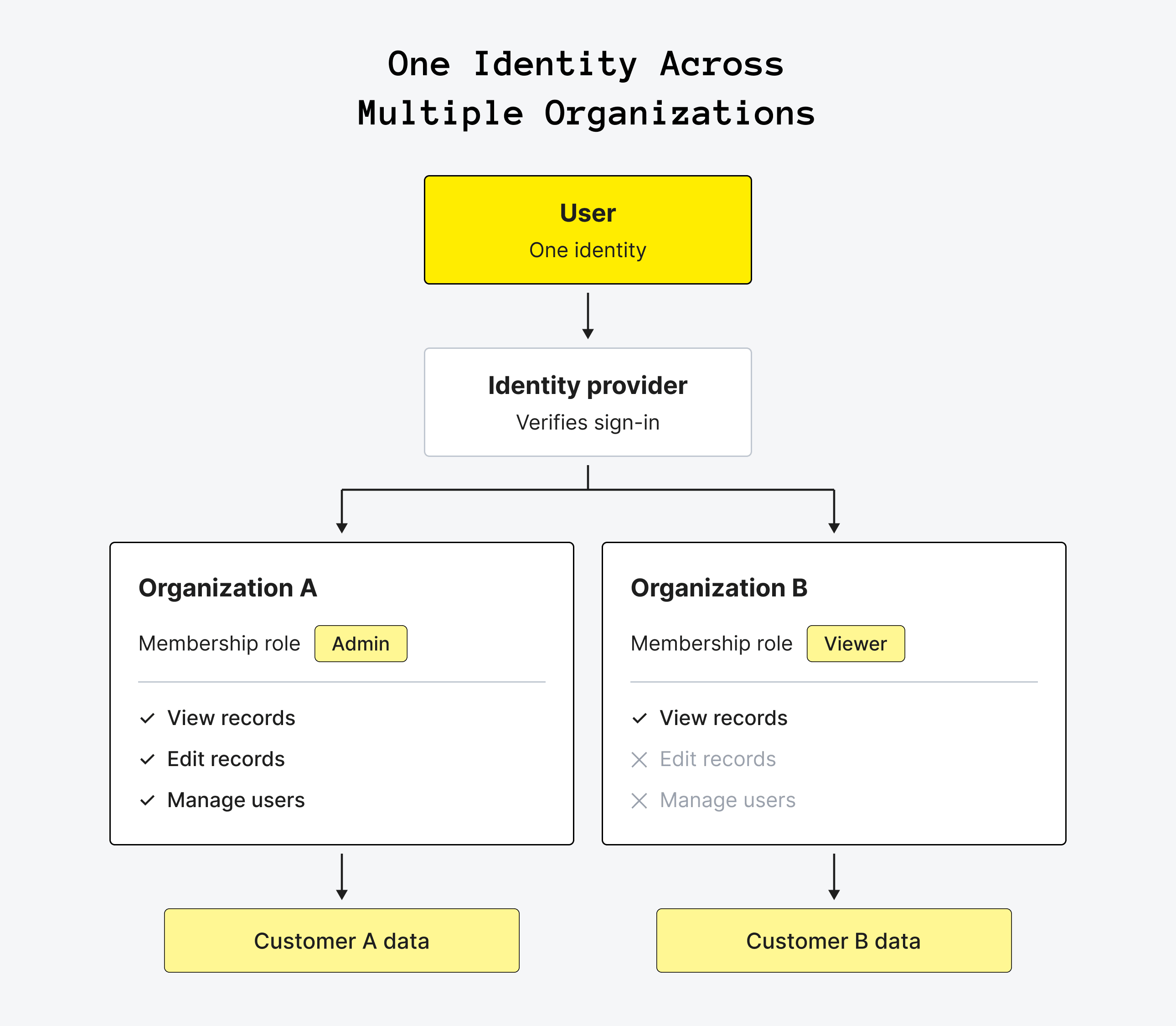
In B2B SaaS, the customer is a company, and several people can use the same account with different responsibilities. An owner might manage billing and invite teammates, while a viewer can only read reports. The same person might also belong to multiple customer accounts, with a different role in each.
That means authentication for SaaS applications needs more than a verified identity. Each request must be handled in the context of the customer account the user is acting in and the permissions they hold there. For example, being an admin in one workspace shouldn't grant admin access to another.
Multi-tenant authentication supports sign-in across these customer accounts. Membership and permission checks then keep access within the right organization, so users can work with the data they need without reaching another customer’s records.
SaaS Authentication Methods Compared
SaaS authentication methods trade convenience against security, and most products offer two or three of them. Let’s compare the most common options and find out where each fits.
There are main SaaS authentication methods. B2B products often offer social login and email for small teams and SSO for larger customers.
How to choose which methods to offer? Before choosing your options, work through four questions:
- How long can you spend on implementation?
- How sensitive is the data, and what will security reviews ask for?
- Are your customers individuals, small teams or enterprises with an identity provider?
- Is the product single-tenant or multi-tenant?
Most products launch with two or three methods and add SSO later. But choosing what to offer is only half the job: the rules behind each method matter just as much. If passwords are part of your sign-in flow, it's worth checking that your policy follows current guidance rather than familiar habits.
The password rules changed in 2025. NIST SP 800-63B-4, the US government's digital identity guidelines and a common reference for security reviews, requires a minimum of 15 characters for passwords used as the only factor and 8 when used with MFA, drops composition rules like "one uppercase and one symbol," and no longer calls for forced periodic password changes. It also requires services at its middle assurance level to offer a phishing-resistant option, such as passkeys. A login screen built to the old rules looks dated to a security reviewer.
Keeping those protections up to date is part of the ongoing work behind a login screen. That brings us to the next decision: which parts should your team build, and which should an authentication provider handle?
Build vs Buy: How to Build a SaaS App With Auth
Most SaaS teams should buy authentication and build authorization and tenancy. Writing sign-in from scratch means owning password hashing, brute-force protection, email verification, password resets, session handling, MFA, social login integrations, SAML and OpenID Connect parsing, and the security fixes for all of them, for as long as the product runs. For most startups, that work doesn't differentiate the product, but it does create more places for security bugs. Microsoft's guidance is clear: don't create your own identity solution.
A hosted provider reduces that workload, although the integration effort still depends on your sign-in flows, existing code, and customer requirements. Treat it as part of your startup tech stack: look at how well it fits your framework, backend, and deployment setup, not just how quickly you can add a login screen.
If you're asking “how do I build a SaaS app with auth?”, start with these five steps:
- Choose a hosted provider.
- Add its sign-in components or redirect.
- Verify its tokens on your backend.
- Map the provider's user and organization IDs to your own records, in one place in your code.
- Add organization checks and roles to every data query.
Keeping the ID mapping in one place makes a later provider switch easier. The final step is what keeps a valid login from becoming unrestricted access: your backend must check both the customer account the user can access and the actions their role permits. Microsoft's guidance recommends Identity-as-a-Service providers over self-hosted open source tools too, unless a compliance, data residency, or reliability requirement rules them out, because running an identity server yourself carries real operational and security overhead.
Self-hosting or using an authentication library makes sense in narrower cases. Options include identity platforms such as Keycloak, Ory Kratos, and Zitadel, or a framework library like Auth.js. A self-hosted setup can give you control over where identity data is stored, which can matter for strict data residency or on-premise deployments. Ory Kratos also has a managed option, so choosing an open source tool doesn't necessarily mean operating it yourself. For smaller apps, Google's Firebase Authentication is another managed option (not a self-hosted alternative) with backend services, SDKs, and ready-made sign-in UI libraries.
At very large user counts, per-user pricing can also make a different setup worth evaluating. Compare the provider bill with the full cost of running your own system, including maintenance and security work, rather than infrastructure alone. Before committing, check your migration options: whether you can export user records and password hashes, and whether the destination supports those hash formats. That compatibility can help you move users without forcing everyone to reset their passwords.
If a hosted provider is the right route, the next question is which one fits your product. Let's compare the options by more than the free user allowance, especially if enterprise SSO is on your roadmap.


Best Authentication Providers for SaaS
Authentication SaaS providers, also called Authentication-as-a-Service, host the sign-in system for you and charge by active users, by SSO connections, or both. The five providers below differ less in what they can do than in how they price it, particularly when enterprise customers start asking for SSO.
We checked these prices in October 2026, but plans and pricing can change. Check each provider’s pricing page before making your choice.
The table shows a pattern. Basic sign-in is cheap or free at MVP scale across all five providers, so the early choice should rest on fit: the framework your product uses, the cloud you're on, and how much prebuilt UI you want. The bigger cost difference appears with enterprise customers, because each company that signs in through its own identity provider adds a connection or a set of federated users.
For a product with 20 enterprise customers, each using one SSO connection, the connection charges alone would be about $1,350 a month on Clerk, $1,700 on Auth0 B2B Essentials, and $2,375 on WorkOS, before any applicable base-plan fees or other charges. Price that costs into the plans those customers buy rather than treating SSO as a free addition.
Clerk vs Auth0 and Auth0 vs Cognito comparisons become more useful when you price your expected mix of active users, customer organizations, and SSO connections. When scaling a SaaS business, the free user allowance matters less than the bill you'll face as more customers need enterprise features. Check which capabilities require a higher plan before committing.
What is the best SSO for SaaS applications? So, “best SSO for SaaS” can mean two things. To give your own team SSO into the tools it uses, the usual choices are Okta, Microsoft Entra ID or Google Workspace; to add SSO to your own product, use a provider from the table above.
The pricing differences become easier to judge once you know what adding SSO actually involves. Let’s see how a customer's identity provider connects to your product, what you need around that connection, and how to account for the cost.
SaaS SSO: How It Works, When to Add It, and How to Price It
Add SaaS SSO when the first customer that manages employees in a corporate identity provider asks for it, and plan the data model for it from the start. SSO for SaaS apps lets a customer's employees sign in with their work account through SAML or OpenID Connect, giving the customer's IT team centralized control over sign-in policies. For enterprise buyers, that control is often a security or procurement requirement rather than a nice-to-have feature.
How SaaS SSO Works
For the SSO SaaS customers use to access your product, an email-first sign-in flow typically follows five steps:
- The user enters their work email on your sign-in page.
- Your app, through your authentication provider, matches the email domain to the company's configured SSO connection.
- The user is redirected to the company's identity provider, such as Okta or Microsoft Entra ID.
- The identity provider authenticates the user and returns a signed SAML assertion or, through the OpenID Connect flow, an ID token.
- Your authentication integration validates the response, creates or updates the user and organization membership according to your provisioning rules, and starts a session.
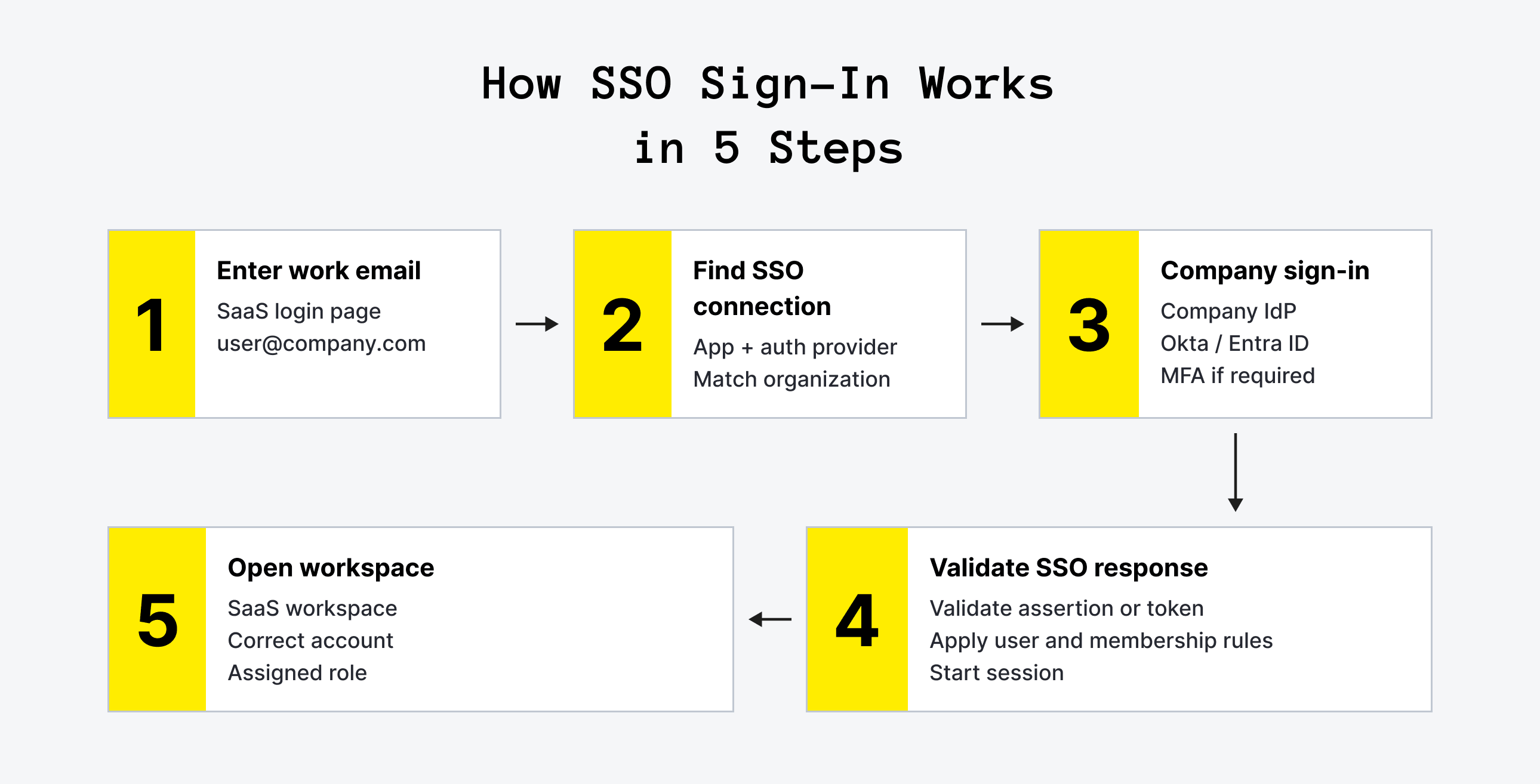
The email domain helps route the request; it isn't proof that the user should have access. That decision depends on the verified SSO response, the connection's organization, and your membership rules.
What to Build Around the SSO Connection
Three pieces come together:
- Connections. Each enterprise customer connects its own identity provider, such as Okta, Microsoft Entra ID, or Google Workspace. Route users to the right connection through a verified email-domain mapping or an organization-specific sign-in URL.
- Provisioning on first sign-in. When enabled, just-in-time provisioning, or JIT provisioning, creates a user record and membership in the correct organization after the user's first successful SSO login. Assign a default role with only the permissions that person needs, rather than granting admin access automatically.
- SCIM directory sync. Larger customers may also want users created, updated, and deactivated in your product when their directory records change. SCIM, a standard for syncing users and groups, handles this lifecycle separately from sign-in. Plan for user states beyond active, such as suspended, deleted and reactivated, so a SCIM update maps cleanly to your records.
SSO SaaS buyers may name a specific protocol. SAML is an XML-based standard widely used in enterprise environments; OpenID Connect is an identity layer built on OAuth 2.0. Support both through your provider rather than assuming a customer's identity platform dictates which one they'll use. Test each new customer's connection before enforcing SSO for their organization, since a misconfigured connection can lock a whole company out.
Keep one owner account per organization that can sign in without SSO, so the customer isn't locked out if its identity provider fails. Treat it as an emergency recovery account: protect it with strong MFA, monitor its use, and test the recovery process with the customer's IT team. It should be a controlled exception, not an everyday way around the customer's SSO policy.
How to Price SaaS SSO
Microsoft's guidance notes that federated sign-in adds real operational cost and that “it's common in SaaS solutions for enterprises to pay for a higher tier that enables federated sign-in.” Put SSO in a business or enterprise plan with enough margin to cover the provider's connection charges, onboarding, testing, and ongoing support, not just the login itself. If SCIM adds a separate provider charge or support workload, account for that in the same plan or price it as an additional capability.
SSO gives the customer's IT team control over sign-in, but it doesn't automatically mean every user completes MFA. Next, let's look at where that extra protection belongs and who should be required to use it.
Is SSO holding up your next deal?
Upsilon can help you add SSO, strengthen access controls, and get your SaaS ready for enterprise customers.

Multi-Factor Authentication: What to Require and When
Multi-factor authentication in SaaS is a practical way to make stolen passwords less useful to attackers. Microsoft's analysis of real account data found that MFA reduced the risk of compromise by 99.22%, and by 98.56% when the attacker already had the user's leaked password. Those figures reflect the commercial accounts studied, rather than a guaranteed reduction for every product.
Stolen passwords remain a leading way in: compromised credentials were the initial access vector in 22% of breaches reviewed in Verizon's 2025 Data Breach Investigations Report.

Four decisions shape the rollout:
- Factors. Offer an authenticator app and passkeys. Keep SMS codes as a fallback at most: phone-based codes face additional security restrictions, and Microsoft's study found SMS 40.8% less effective than Microsoft Authenticator in its sample of accounts with leaked credentials.
- Required users. Require MFA for account owners and admins from launch, since they can change billing, manage users, and access sensitive data. For lower-risk products, make it optional for other users at first; products handling sensitive information may need broader enforcement from the start.
- Policy control. Let each customer's admins require MFA for all members of their organization. This gives customers control over their own access policies without making your team configure every account manually.
- Step-up checks. Ask for a second factor again before sensitive actions, such as changing billing, exporting data, or editing SSO settings, even within an active session. This applies the step-up authentication approach to actions where an unauthorized change would have a larger impact.
For users who sign in through SSO, the customer's identity provider can handle MFA. Agree on and enforce that policy as part of the SSO setup rather than assuming an SSO login always includes a second factor; your product's own MFA flow covers users signing in directly through password or email-based methods.
Once a user has proved who they are, your product still has another decision to make: what should they be allowed to do? That's where organization memberships, roles, and permissions take over.
User Roles and Permissions per Customer Account
User roles and permissions per customer account are the part of SaaS authentication you build yourself, because they follow your product's data. The model that holds up from MVP to enterprise has four pieces.
Organizations
Each customer account is an organization, and billing, settings, and data belong to it.
Memberships
A user joins an organization through a membership that carries a role. One user can belong to several organizations (an agency working for three clients, for example) with a different role in each. Microsoft's guidance recommends one account per person across tenants instead of a separate login for each.
Roles and Permissions
Start with a few roles and store them as data in the database, instead of checks scattered through the code. Build access checks around named permissions, so each role maps to the actions it allows.
A starting set of roles for a B2B SaaS product. Custom roles come later, often when an enterprise customer asks.
Custom roles follow the same pattern with more granularity. Instead of relying only on fixed roles, define permissions such as “edit invoices” or “export data,” and let customer admins combine them into their own roles. Building the permission checks around named permissions from the start, even while only four roles exist, makes that later step easier to add without rewriting access checks. Some enterprise customers go further and ask for rules based on attributes, such as region or department, which is called attribute-based access control (ABAC); named permissions make that step easier too.
Tenant Checks Everywhere
Each query for customer data filters by organization ID, enforced in a shared layer of the code or in the database itself, for example with PostgreSQL row-level security. One missed check that shows Customer A's data to Customer B is a security incident, not just a permissions bug. Tenant isolation needs to hold regardless of the user's role within their own organization.
Around that core sit the features B2B customers expect: invitations by email that expire, domain-based auto-join so employees with a verified company email can join their organization, admin screens where each customer manages its own users, and an audit log of sign-ins and permission changes. If your support team needs to see a customer's account, build impersonation as a logged, time-limited session with a visible banner, not a shared password. Enterprise security reviews ask how support staff access customer data.
That's a lot to plan, but not everything needs to ship in the first release. Let's put these pieces into a roadmap so you can distinguish launch essentials from features that can wait for customer demand.
B2B SaaS Authentication Roadmap: From MVP to Enterprise
B2B SaaS authentication grows in stages, and each stage adds what the next type of customer asks for. Use this roadmap to separate the foundations you need at launch from the features you can add when demand appears. The stages aren't rigid: a product built for enterprise buyers may need SSO before its first paying customer.
The priority is to get the boundaries right early: who belongs to each customer account, what they can do, and which data they can access. More advanced sign-in and administration features can then build on that foundation instead of forcing you to replace it.
In SaaS MVP development, еhe organization model belongs in the first release even though enterprise features don't. Adding organizations to a product built around individual users means migrating records and updating access checks, while adding SSO to a product that already has organizations builds on an existing account structure.
The roadmap leaves room to defer features, but some shortcuts make those later stages harder to reach. Before deciding what can wait, watch for the choices that turn a manageable addition into a rewrite.
Mistakes That Make SaaS Authentication Expensive Later
The most expensive authentication mistakes rarely look urgent at launch. A hardcoded role gets the feature shipped, a hidden button seems to restrict access, and organizations can feel unnecessary when every customer is still one person. The trouble starts when those shortcuts become the foundation for paying teams. Avoiding the following mistakes helps you keep the first version lean without turning each new customer requirement into a rewrite.
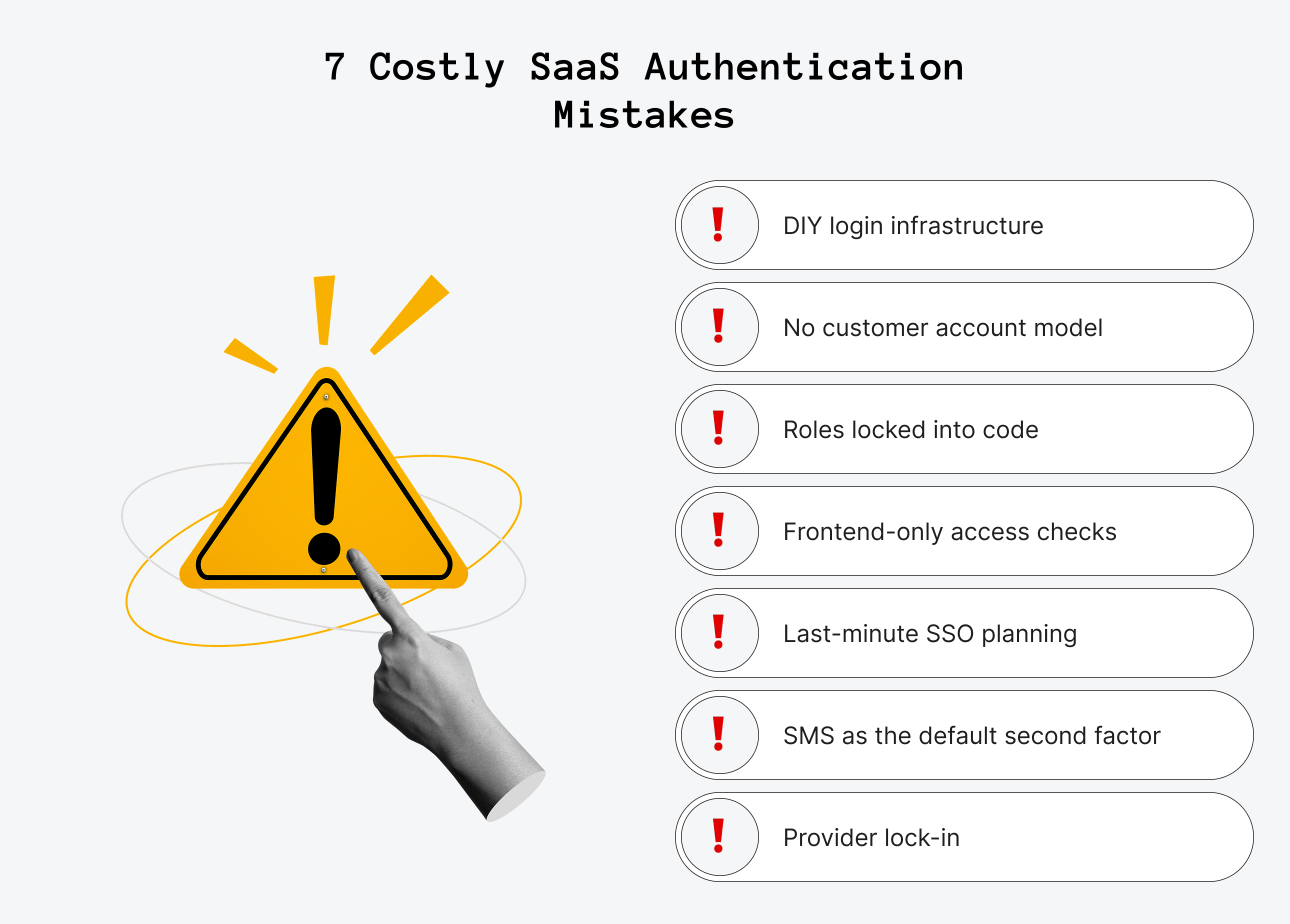
Building Sign-In From Scratch
Months of work can go into features a provider already includes, and the security fixes keep coming after launch. Spend that time on the workflows customers pay for, rather than maintaining another login system.
Leaving Out Organizations
A product built around individual users needs data migrations and new access rules when the first company wants several seats. Model organizations from day one, even if each account initially has only one member.
Hardcoding Roles
A small MVP scope is a good reason to launch with just a few roles, not to scatter checks like “if the user is an admin” throughout the code. Store roles and permissions as data, and check for the permission an action requires. That keeps the first version simple without making custom roles harder to introduce later.
Trusting the Front End to Enforce Access
Hiding a button doesn't stop an API call. Check permissions and organization ID on the server for each request; the interface should reflect those rules, not enforce them on its own.
Waiting for the First Enterprise Deal to Plan SSO
A prospective customer may give you weeks to deliver SaaS SSO. You don't need to build it before anyone asks, but choosing a compatible provider and planning the organization model early keeps that request from becoming an architectural change.
Relying on SMS for MFA
SMS codes can be intercepted or redirected through SIM swaps. Offer authenticator apps and passkeys first, with SMS as a fallback where needed rather than your main protection.
Choosing a Provider With No Exit
Before committing, check whether you can export user records and password hashes, and whether another provider can import the hash formats. An export alone doesn't guarantee an easy migration, but checking compatibility early reduces the risk of a forced password reset for every user.
The common thread is knowing what to postpone and what to get right early. You can launch without every enterprise feature, but identity, customer boundaries, and access rules need a clear foundation.
Final Thoughts on SaaS Authentication
SaaS authentication isn't a feature you finish when the login screen works. The real goal is to let the right people into the right customer account, with access that matches their role. A hosted provider can handle sign-in, but your product still needs a clear model for organizations, memberships, and permissions.
You don't need every enterprise feature at launch. Get the foundations right, protect privileged accounts with MFA, and choose a provider whose SSO pricing makes sense for the customers you plan to serve. Then add capabilities as real requirements emerge, rather than building an enterprise checklist into your MVP.
Need a development partner to put that plan into practice? Explore our SaaS application development services, including user management, role-based access control, and SSO integrations. Whether you're planning your first release or preparing for larger customers, contact us to discuss what your product needs now and what can wait.
FAQ
1. What is SaaS authentication?

SaaS authentication is how a Software-as-a-Service product confirms who is signing in, through a password, a magic link, a social login, a passkey, or single sign-on with the customer's own identity provider. In a B2B product it works with authorization, which decides what each person can do, and with tenancy, which keeps each customer account's users and data separate from all other accounts.
2. Should I build or buy authentication for my SaaS?
Buy it, in most cases. Providers like Auth0, Clerk, Amazon Cognito, WorkOS, and Supabase handle password storage, MFA, social login, and SSO, and they cost little at MVP scale. Microsoft's SaaS architecture guidance is direct about it: don't create your own identity solution. Build the parts specific to your product instead: the organization model, roles, permissions, and the checks that keep each customer's data separate.
3. What is the difference between SAML and OAuth for SaaS authentication?
SAML is an older XML-based standard that many enterprise identity providers use for single sign-on. OAuth 2.0 is a standard for granting an app access to resources, and OpenID Connect adds a sign-in layer on top of it. Most B2B SaaS products need to accept both SAML and OpenID Connect for SSO, because enterprise customers use different identity providers. Auth providers handle both protocols for you.
4. Is SSO the same as multi-factor authentication?
No. Single sign-on lets employees sign in to your product with their company account, so their employer controls access and offboarding. Multi-factor authentication asks for a second proof of identity, such as an authenticator app or passkey. With SSO, MFA happens at the customer's identity provider in most setups. For users who sign in with a password, your product needs its own MFA.
5. What is the cheapest way to add authentication to a SaaS startup?
Use a hosted auth provider's free tier. Clerk and Supabase include 50,000 users free, Auth0 includes 25,000, and Amazon Cognito includes 10,000. That covers most MVPs, so the real cost is integration time, from a few days to two weeks. Costs rise later with enterprise SSO connections, which run $75 to $125 per connection a month on the major providers.
6. How do you handle roles and permissions in a multi-tenant SaaS app?
Model customer accounts as organizations, and link users to organizations through memberships that carry a role, such as owner, admin, member, or viewer. Store roles and permissions in your database instead of hardcoding them, check the organization ID on each data query, and let each customer's admins manage their own users. One user can belong to several organizations with a different role in each.



to top