AI Agent Use Cases: Where Agents Drive Business Transformation in 2026


AI agents are moving beyond experimentation to become practical tools for business transformation. They can handle multi-step workflows, automate repetitive tasks, and help teams make better use of their time. According to Gartner, 40% of enterprise applications are expected to include task-specific AI agents by the end of 2026, up from less than 5% in 2025.
However, adoption at scale remains a challenge. McKinsey's 2025 State of AI survey found that 62% of organizations were at least experimenting with AI agents, while only 23% were scaling them somewhere in the business. This gap highlights the importance of choosing practical applications with clear business value rather than adopting AI simply to follow a trend.
This guide explores use cases for AI agents across eight business functions and eight industries, from customer support and sales to healthcare, banking, logistics, and software development. The AI agent examples include reported business results, practical applications, and the constraints that shape implementation. You'll also learn how multi-agent systems work, when a single agent is the better choice, how to select and validate an initial workflow, and which common mistakes can undermine an AI project.
Key Takeaways:
- AI agents go beyond answering questions. They can make decisions, interact with connected systems, and complete multi-step tasks across customer support, sales, finance, HR, IT, and other business functions.
- AI agent use cases vary by industry. Banking, healthcare, insurance, retail, manufacturing, logistics, legal, and SaaS businesses can all benefit, but each requires safeguards tailored to its operational risks and regulatory requirements.
- Start with a focused, high-volume workflow. The strongest candidates have clear rules, accessible systems, measurable outcomes, and a reliable human fallback.
- Multi-agent systems aren't always necessary. A single agent is usually a sensible starting point. Multiple specialized agents make sense when a workflow involves distinct tasks and the expected benefits justify the added complexity and cost.
- Successful implementation requires ongoing oversight. Clear permissions, reliable data, baseline metrics, human escalation, and gradual testing help reduce risks and establish whether an AI agent delivers real business value.
What Counts as an AI Agent Use Case
An AI agent use case is a multi-step task that software completes by making decisions, using connected tools, and working within boundaries set by people. Unlike traditional automation, which follows predefined rules, an AI agent can respond to changing circumstances and determine what to do next. Three characteristics distinguish an AI agent from a conventional chatbot or a rule-based workflow.
It Decides the Next Step
A rule-based workflow follows a predetermined path. For example, it might approve an invoice automatically if the total matches the purchase order. An AI agent can handle more complex situations: it reads the invoice, identifies a mismatch, checks the contract for relevant terms, and decides whether to request clarification, gather additional information, or escalate the case for review. This ability to adapt its next action to the information it receives makes agents useful for workflows that involve exceptions and multiple decision points.
It Acts Through Tools
AI agents connect to systems such as customer relationship management (CRM) platforms, ticketing tools, enterprise resource planning (ERP) software, and calendars through APIs. These interfaces allow one system to retrieve information from or perform authorized actions in another, enabling the agent to move beyond generating text and interact with existing business processes.
For example, a chatbot that answers, "Where is my order?" simply provides information. An AI agent can look up the order, identify a customs delay, file a claim with the carrier, and email the customer with an update. The actions available to the agent depend on the integrations and permissions configured for it. This distinction is important when comparing AI chatbots with agents designed to execute tasks rather than only respond to questions.
It Works Toward an Outcome
An AI agent is designed to achieve a defined goal, such as resolving a support case, completing an employee request, or processing an invoice. It can perform several actions in sequence, check the results, and determine whether another step is needed to finish the task.
However, greater autonomy also introduces risks. An incorrect decision can lead to incorrect actions across connected systems, so agents need appropriate permissions, safeguards, and escalation rules. Sensitive actions may require human approval, while unusual cases should be routed to someone who can assess the situation. Clear boundaries help businesses benefit from automation without giving agents unrestricted control over critical processes.


AI Agent Use Cases by Business Function
The most practical AI agent use cases have one thing in common: they automate tasks that require someone to review information, make a decision, and take action. AI agents can handle these steps across connected systems, reducing manual work and helping teams focus on tasks that need human judgment.
The following AI agent examples show how businesses apply AI to practical workflows across customer support, sales, marketing, finance, HR, IT, software development, and operations. Each use case addresses specific business needs, from handling routine requests to coordinating more complex tasks across connected systems.
Customer Support
Customer support is a common starting point for AI agent adoption because many requests follow predictable patterns. Salesforce, for example, uses its own support technology to resolve about 76% of inquiries without human intervention. When a request is more complex, such as an API limit increase, the agent can transfer the conversation to a live engineer in the same chat window.
- What it does: Answers routine questions, performs basic account actions, and opens support tickets.
- Systems: Help desk, knowledge base, CRM.
- KPIs: Resolution rate, response time, cost per ticket.
- Human oversight: Complex requests are escalated with the full conversation context.
Sales and Lead Qualification
Following up with leads quickly can make a difference to sales performance. Salesforce reports that historically, only one in four of its leads received a follow-up. Its agents now contact and qualify prospects within minutes and book meetings. The Engagement Agent has reached 100,000 leads, created 1,500 opportunities, and is on track to generate $60 million in pipeline.
- What it does: Qualifies leads, enriches prospect data, routes opportunities, and follows up.
- Systems: CRM, email, data enrichment tools, calendar.
- KPIs: Speed-to-lead, meetings booked, pipeline value.
- Human oversight: Sales representatives take over once a prospect is qualified and the conversation needs a personal touch.
Marketing and Content
AI agents can help marketing teams produce and adapt content faster while keeping campaigns moving. Klarna uses its in-house Copy Assistant for 80% of its copywriting. The company also reduced its image development cycle from six weeks to seven days. According to Klarna, AI saves the company around $10 million annually while enabling it to run more campaigns.
- What it does: Drafts and localizes copy, generates visuals, and repurposes existing assets.
- Systems: CMS, digital asset management tools, analytics platforms.
- KPIs: Content output, time to publish, cost per asset.
- Human oversight: Marketing teams review brand consistency and factual accuracy before publication.
Finance and Accounting
Finance is a promising area for AI agents because many tasks involve structured data, repetitive checks, and time-sensitive decisions. Collections is one example. Microsoft's Treasury team built an agent that prioritizes case managers' work, routes customer emails, and matches payments to invoices. As a result, matching accuracy increased from 40% to 90%, and customer inquiries were resolved 2.5 times faster.
- What it does: Matches payments to invoices, predicts late payments, and drafts customer replies.
- Systems: ERP platforms such as SAP and Dynamics 365, email, CRM.
- KPIs: Cash application rate, days sales outstanding, resolution time.
- Human oversight: Case managers handle disputes and key accounts that require individual attention.
HR and Recruiting
HR teams deal with a steady flow of employee questions, requests, and administrative tasks. AI agents can take care of routine interactions, leaving HR professionals more time for sensitive employee matters. IBM's AskHR agent automates more than 80 HR tasks, resolves 94% of common questions without human intervention, and has helped reduce HR operating costs by 40% over four years.
- What it does: Answers policy questions, processes HR requests, and screens candidates.
- Systems: HRIS platforms such as Workday and SAP SuccessFactors, applicant tracking systems (ATS), payroll software.
- KPIs: Ticket volume, time to resolution, employee satisfaction.
- Human oversight: HR partners handle sensitive cases and requests that require a more nuanced decision.
IT and Internal Help Desk
IT support is another natural fit for AI agents. Tasks such as password resets, account unlocks, and VPN troubleshooting are common and often follow established procedures. According to the Register's report on ServiceNow, the company's internal agent handles more than 90% of targeted Level 1 IT tickets autonomously, with resolution rates above 99% in those categories.
- What it does: Troubleshoots common issues, resets access, and creates or routes tickets.
- Systems: IT service management (ITSM) platforms, configuration databases, identity management tools, Slack or Teams.
- KPIs: Self-service rate, mean time to resolution.
- Human oversight: Engineers handle security-sensitive requests and issues that require specialized expertise.
Software Development
Coding agents can support developers throughout the software development lifecycle, from understanding legacy code to testing and reviewing changes. At Morgan Stanley, the in-house DevGen.AI tool translates legacy code into plain-English specifications. It saved developers more than 280,000 hours in its first months, while engineers continued to write the final code.
- What it does: Explains code, refactors existing implementations, generates tests, and reviews changes.
- Systems: Code repositories, CI/CD pipelines, issue trackers.
- KPIs: Development cycle time, developer hours saved, defect rate.
- Human oversight: Developers review code and approve merges before changes are integrated.
Operations, Supply Chain, and Knowledge Management
In operations and supply chain management, AI agents can help teams respond to changing demand, identify exceptions, and find relevant information across company systems. Walmart's self-healing inventory system identifies overstock and redirects it to stores that need it, saving more than $55 million. Walmart's agentic tools also let associates ask questions such as which items were shorted at particular stores and receive actionable next steps in seconds rather than hours.
- What it does: Rebalances inventory, flags exceptions, and answers questions using company data.
- Systems: ERP platforms, warehouse management systems, inventory databases, knowledge bases.
- KPIs: Stock availability, waste, exception handling time.
- Human oversight: Operations managers approve major inventory transfers and orders.
Across these functions, the best AI agent use cases target clearly defined tasks with measurable outcomes and reliable access to the systems needed to complete them. Human oversight remains essential for sensitive decisions, unusual cases, and actions with significant financial or operational consequences. The strongest starting point is usually a well-understood workflow where automation can reduce manual effort without removing accountability.
Seeking help with building your product?
Upsilon has an extensive talent pool made up of experts who can help bring your AI ideas to life!

Enterprise AI Agent Use Cases by Industry
Enterprise AI agent use cases vary by industry because each sector faces different risks, regulations, and operational demands. A bank must prevent payment errors, a hospital needs accurate patient records, and a law firm cannot rely on an invented legal clause. Companies seeing meaningful results tend to start with a well-defined, high-volume task and build in clear checkpoints for human review. Here are eight industries where AI agents are making a difference, with examples, common applications, and the constraints that shape their implementation.
Banking and Financial Services
BNY has developed what it calls "digital employees," with nearly 140 multi-agent workers, each assigned a login, employee number, and human supervisor. In payment processing, these agents complete validations that once took five or six minutes in under 30 seconds. The company has also reported a nearly 80% reduction in open payment investigations, according to Microsoft's account of BNY's AI transformation.
- Top use cases: Payment repair, reconciliation, client onboarding, and Know Your Customer (KYC) checks.
- Key constraint: Every action must be auditable. BNY records the rationale behind each step.
Insurance
Claims processing is a strong fit for AI agents because it involves high volumes of requests, established policy rules, and customers waiting for settlements. Allianz's Project Nemo uses seven specialized agents to check coverage, verify weather events, screen for fraud, calculate payouts, and audit the process in under five minutes. Allianz reports an 80% reduction in processing and settlement time for food spoilage claims, with the system launched in less than 100 days.
- Top use cases: Claims triage, fraud screening, policy servicing, and underwriting preparation.
- Key constraint: Payout decisions are not fully automated at Allianz. A claims professional makes the final decision.
Healthcare
Clinical documentation takes up a significant portion of a physician's working day, making it one of the leading applications of AI in healthcare. At the Permanente Medical Group, part of Kaiser Permanente, AI scribes listen to patient visits and draft clinical notes. The tools saved physicians the equivalent of 1,794 working days in a single year.
- Top use cases: Clinical documentation, prior authorization, patient scheduling, and referral routing.
- Key constraint: Patient consent and clinician approval are essential. AI-generated notes are reviewed before being added to a patient's record.
Retail and E-commerce
In retail, AI agents are moving beyond answering product questions to helping customers complete purchases. Amazon reports that its agentic shopping assistant, Rufus, was used by more than 300 million customers in 2025 and helped generate nearly $12 billion in incremental annualized sales. Its "Buy for Me" feature can also purchase products from other online stores on a customer's behalf.
- Top use cases: Shopping assistants, dynamic pricing, returns handling, and catalog enrichment.
- Key constraint: Customer trust is critical. Agents that spend money on a customer's behalf need explicit consent and clearly defined limits.
Manufacturing
Manufacturers can use AI agents alongside digital twins to test potential changes virtually before modifying a production line. With Siemens' digital twin technology, PepsiCo uses AI agents to simulate and refine plant changes, identifying up to 90% of potential issues before physical modifications are made. The first deployment increased throughput by 20%.
- Top use cases: Production planning, predictive maintenance, quality inspection, and automation code generation.
- Key constraint: Physical safety comes first. Engineers validate AI-generated changes in simulation before applying them to live equipment.
Logistics
Logistics operations involve large numbers of routine calls and emails, from scheduling appointments to checking estimated arrival times and confirming deliveries. DHL Supply Chain has deployed AI agents to handle these interactions by phone and email. The agents now process hundreds of thousands of emails and millions of minutes of voice interactions annually.
- Top use cases: Carrier tracking, appointment scheduling, customs preparation, and exception alerts.
- Key constraint: Information must be accurate and up to date. An incorrect arrival estimate can disrupt multiple stages of a supply chain, so agents need to escalate exceptions to human operators.
Legal
Law firms are using AI agents to support document-heavy tasks that involve multiple steps and detailed analysis. A&O Shearman has introduced agents for antitrust filing analysis, cybersecurity, fund formation, and loan review. According to the firm, the agents can complete in minutes work that previously took several hours. Developed with legal AI company Harvey, the tools are also being offered to clients and other law firms.
- Top use cases: Contract review, due diligence, regulatory filing analysis, and legal research.
- Key constraint: Accuracy and confidentiality are essential. Lawyers review outputs, and client data must remain in secure environments.
SaaS and Technology
Technology companies are applying AI agents to their own software development processes. At Uber, more than 70% of pull requests are attributed to AI agents. Managed agents also review code, repair failing builds, and triage on-call alerts, while human engineers review the results.
- Top use cases: Code review, CI/CD repair, incident triage, and in-app support agents.
- Key constraint: Costs need close monitoring. Token usage can grow quickly at scale, so teams benchmark different models to find the most cost-effective option for each task.
A Note on Regulation
Businesses operating in the EU also need to account for the EU AI Act. According to the current implementation timeline, rules for high-risk applications, including certain uses in credit scoring, recruitment, and life and health insurance pricing, apply from 2 December 2027. Rules for AI embedded in regulated products follow on 2 August 2028.
For banks, insurers, and HR teams, this makes documentation, human oversight, and audit trails important considerations from the beginning of an AI project. Building these safeguards into the system early can help businesses prepare for compliance requirements without having to retrofit essential controls later.

Use Cases for Multi-Agent AI in Business
Multi-agent AI splits one complex job across several specialized agents that plan, divide, check, and combine the work. It pays off in a narrow set of business use cases for AI agents, mostly research, analysis, and review tasks that break into independent parts. For everything else, a single well-designed agent is usually faster, cheaper, and more reliable.
What Is a Multi-Agent AI System?
A multi-agent system is a team of AI agents, each with its own instructions, tools, and context, coordinated toward a shared goal. The most common design is the orchestrator-worker pattern. In Anthropic's multi-agent research system, a lead agent plans the task, delegates parts of it to specialized subagents working in parallel, and then combines their findings into one answer.
There are several other patterns that businesses can combine:
- Sequential pipeline: Each agent completes one step and passes the result on, like an assembly line.
- Parallel agents: Several agents work on separate parts of the problem at the same time.
- Routing: A front-door agent classifies each request and sends it to the right specialist.
- Generator and critic: One agent produces a draft, and another evaluates it and sends it back until it meets the bar.
The key design choice is how work is split. Anthropic recommends a context-centric view: split work only where each agent can operate with its own clean, isolated context. Splitting by job title (planner, coder, tester, reviewer) often creates more handoffs than value.
Where Multi-Agent AI Fits in Business
The strongest use cases for multi-agent AI in business follow one of the patterns above:
- Research and due diligence: Parallel agents investigate markets, competitors, or targets and report back to a lead agent. Anthropic's research system, with this design, beat a single agent by 90.2% on its internal research evaluation.
- Idea generation and review: Generator and critic agents propose, challenge, and rank options. Google's Co-Scientist uses agents for generation, peer review, ranking, and evolution of scientific hypotheses. At Imperial College London, it produced in days a hypothesis that took the research team years to develop.
- Multi-system operations: Specialist agents, each with a focused set of tools, handle CRM, billing, and support systems behind one routing agent.
- Financial analysis: Separate agents analyze revenue, costs, and market comparisons at the same time.
When Multi-Agent Beats a Single Agent, and When It Doesn't
According to Anthropic, multiple agents consistently win in three situations: when irrelevant information would clutter a single agent's context, when tasks can run in parallel, and when specialization improves focus. One practical signal is an agent with too many tools. Anthropic notes that agents with 20 or more tools often struggle to pick the right one.
The type of task matters most. In Google Research's study of 180 agent configurations, a coordinated multi-agent setup improved performance by 80.9% on parallelizable financial reasoning tasks. On step-by-step planning tasks, every multi-agent variant made results worse, by 39% to 70%. The same study found that agents working in parallel without an orchestrator amplified errors up to 17.2 times, compared with 4.4 times for systems with a central coordinator.
Cost is the second constraint. Anthropic reports that multi-agent systems use about 15 times more tokens than a standard chat, and 3 to 10 times more than a single agent doing the same job. The task has to be valuable enough to justify that spend.
Reliability is the third. A UC Berkeley study, Why Do Multi-Agent LLM Systems Fail?, analyzed more than 1,600 execution traces and identified 14 distinct failure modes. Most came from system design and coordination, such as unclear specs, lost handoffs, and missing verification, not from the underlying model.
A good rule of thumb is to start with one agent and consider a multi-agent setup only when the workflow involves distinct, independent tasks, one agent struggles to handle the complexity, and the expected benefits justify the additional cost.

How to Choose the Best AI Agent Use Cases for Your Business
Choosing the right AI agent use case starts with finding a workflow where automation can deliver measurable value without introducing unnecessary risk. A task may look repetitive at first, but that does not automatically make it a good candidate for an AI agent. The process should be sufficiently frequent, follow clear rules, rely on accessible systems, and have a reliable fallback when the agent cannot complete a task safely.
Let’s evaluate potential workflows against six criteria before committing to development.
A strong first AI agent use case should ideally meet at least five of these six criteria. This is a practical screening guideline rather than a strict formula. A workflow with significant legal, financial, or operational risks may still be unsuitable even if it scores well on the other factors.
Example: Choosing a First Agent for a B2B SaaS Company
Consider a B2B SaaS company that receives 2,000 support tickets each month. Its support team handles several recurring request types:
- 600 password resets and login problems. These requests typically follow documented troubleshooting steps.
- 400 billing questions. Many can be answered using the pricing page and invoice history.
- 150 cancellation requests. These may involve retention offers, account-specific circumstances, and decisions that require judgment.
Login support is the strongest starting point. The requests are frequent, the troubleshooting process is documented, the identity system provides an API, and most actions are reversible. The company can also measure resolution time and successful self-service rates, while its existing support team remains available for escalations.
Billing questions could be the next candidate, especially if the agent initially has read-only access to invoices and can answer questions without changing financial records. Refunds or billing adjustments could be introduced later with clearly defined limits and approval requirements.
Cancellation requests are less suitable for an initial pilot because retention decisions can depend on customer circumstances and mistakes may result in lost revenue. The company could automate straightforward parts of the process while leaving retention offers and unusual cases to human representatives.
The most sensible approach is to begin with login support, evaluate performance over the first month, and expand into billing only after the initial workflow proves reliable.
Four Steps to Validate an AI Agent Use Case
Before investing in full-scale development, it’s worth validating whether an AI agent can handle the task reliably and deliver measurable business value. These four steps help turn a promising idea into a well-scoped pilot with clear goals, safeguards, and criteria for success.
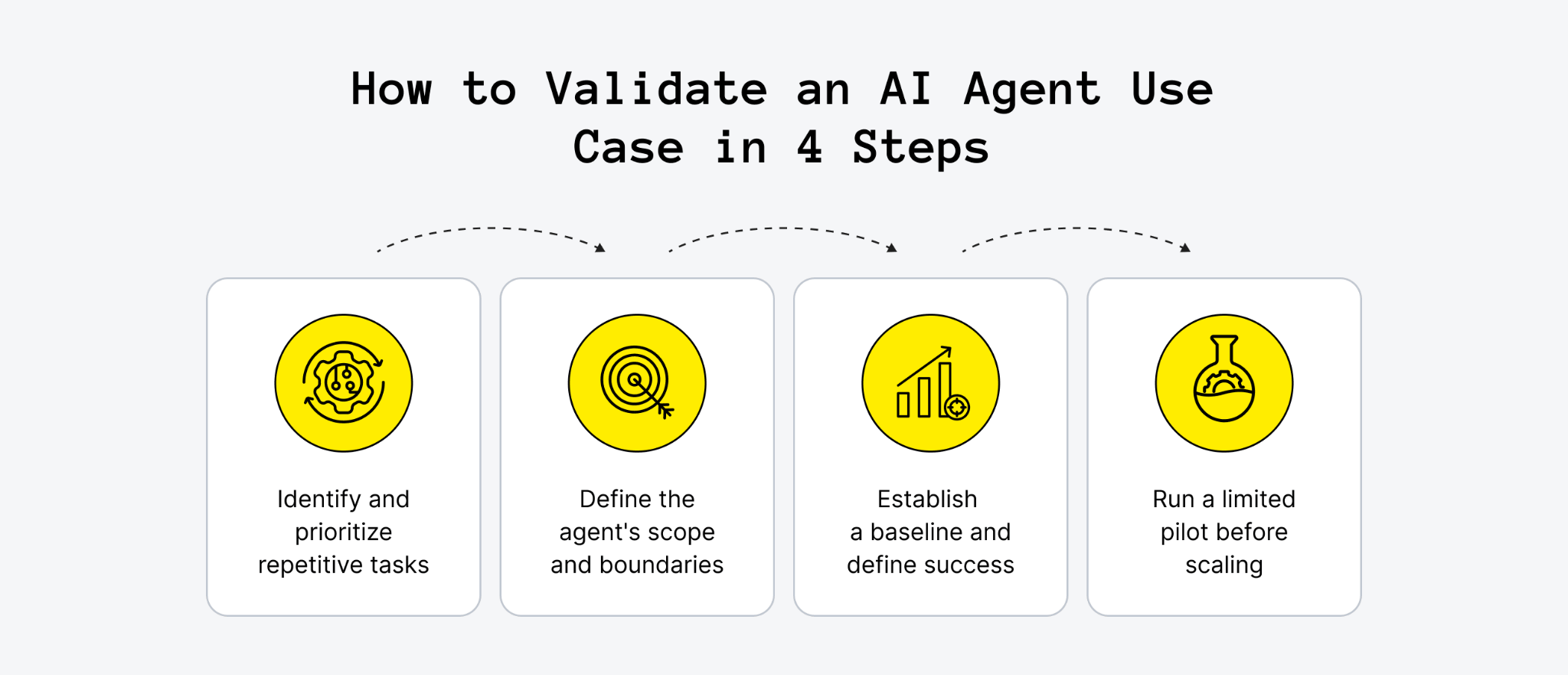
1. Identify and Prioritize Repetitive Tasks
Start by reviewing a month of support tickets, employee requests, financial transactions, or other records from a single business function. Group the work into categories and compare their frequency, complexity, and handling time.
The goal is to identify tasks that occur often and follow a reasonably consistent process. For each candidate, consider:
- How many times does the task occur each week or month?
- How much employee time does each case require?
- Which steps are repetitive, and which require individual judgment?
- How often do exceptions occur?
A high-volume task is not automatically the best choice. A slightly smaller category with clearer rules and fewer exceptions may be easier and safer to automate first.
2. Define the Agent's Scope and Boundaries
Once a promising workflow has been identified, map out the steps required to complete it. Specify which actions the agent can perform independently, which systems it can access, and when a person needs to intervene.
For example, a billing agent might answer invoice questions and issue refunds up to $100, while escalating larger amounts for approval. An HR agent might retrieve payroll information but have no permission to modify salary records.
It is also important to define what happens when the agent encounters missing information, conflicting records, or a request outside its permitted scope. Clear escalation rules, restricted permissions, and approval checkpoints help prevent small errors from turning into larger problems.
3. Establish a Baseline and Define Success
Before SaaS development begins, measure how the workflow performs without an AI agent. This baseline makes it possible to assess whether automation produces a meaningful improvement.
Depending on the use case, relevant measurements may include:
- Handling time: How long it takes to complete each case.
- Resolution rate: How many cases are completed without human intervention.
- Error rate: How often the process produces an incorrect result.
- Cost per case: The average cost of handling a request.
- Escalation rate: How often a case requires human assistance.
- User satisfaction: How employees or customers rate the experience.
Choose a small set of metrics that reflect the actual business goal. For example, reducing handling time is useful only if accuracy and customer satisfaction remain acceptable. The evaluation should also account for implementation, integration, maintenance, and ongoing AI usage costs.
4. Run a Limited Pilot Before Scaling
Test the agent on a small share of eligible cases before expanding its responsibilities. A starting point might be 10% to 20% of cases, provided the workflow is low-risk and the business has appropriate monitoring and fallback procedures.
During the pilot, review performance weekly. Check whether the agent completes tasks correctly, follows its permissions, recognizes cases it cannot handle, and escalates them appropriately. Compare the results with the original baseline rather than relying on the number of tasks processed alone.
If the results are consistent, gradually increase the volume or introduce another task category. If errors or unnecessary escalations remain common, refine the instructions, integrations, or workflow before expanding access.
The goal is to validate both technical reliability and business value before committing to a broader rollout. This AI agent MVP guide explains how to scope and validate an initial version before investing in a larger implementation.
Why Most AI Agent Projects Stall
Gartner predicts that more than 40% of agentic AI projects will be canceled by the end of 2027 because of rising costs, unclear business value, or inadequate risk controls.
One contributing factor is what Gartner calls "agent washing," when vendors rebrand chatbots or scripted automation as AI agents without delivering meaningful agent capabilities. However, even well-designed agents can fall short if businesses choose the wrong workflows, overlook operational risks, or scale too quickly. Several common implementation mistakes are worth avoiding.
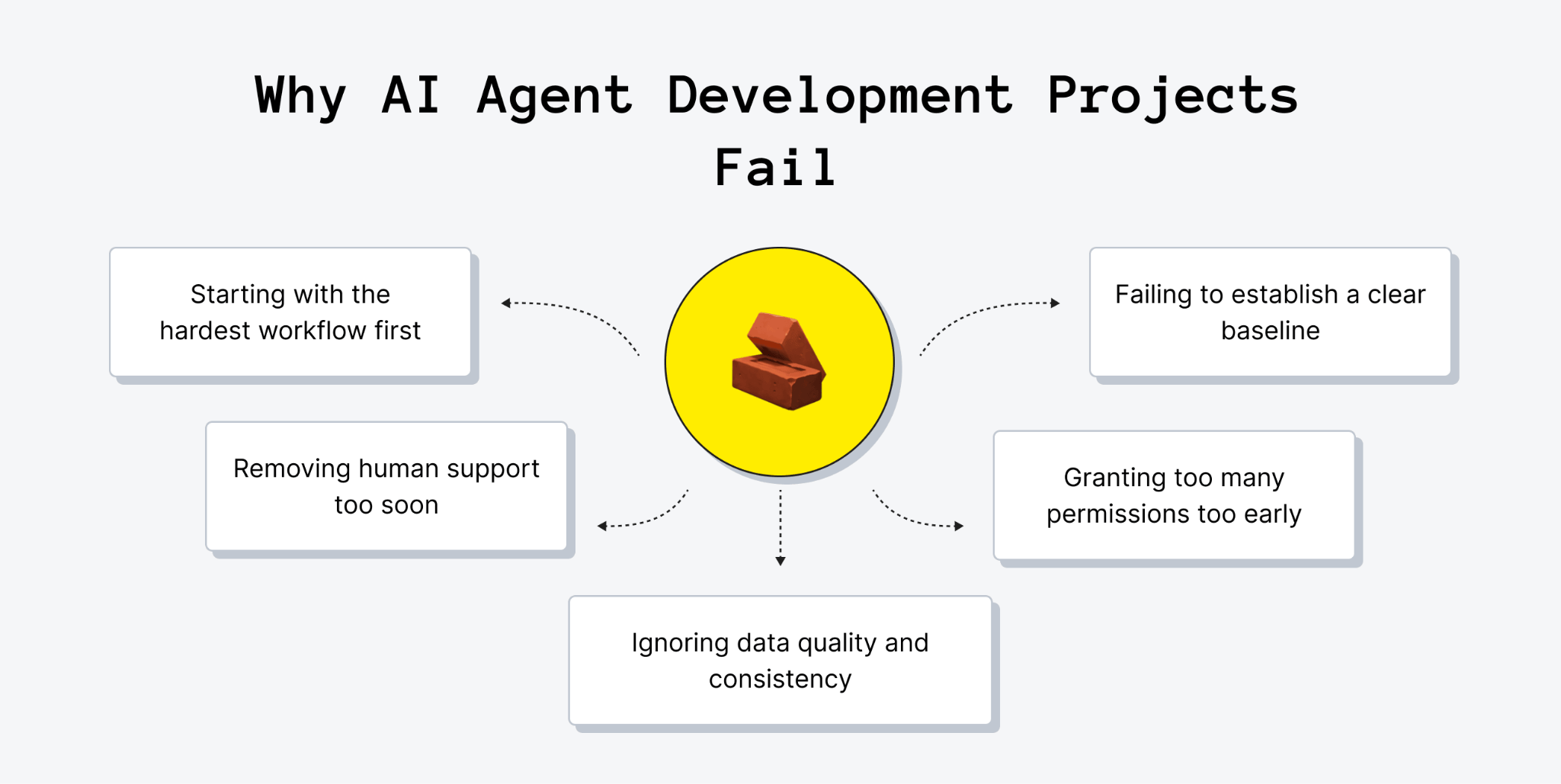
Starting With the Hardest Workflow
It can be tempting to begin with the most ambitious or impressive use case, but complexity makes it harder to validate an agent's value. A narrow agent that handles a frequent, well-defined task can demonstrate results sooner and provide useful lessons for future projects.
By contrast, an agent built for an open-ended workflow with unpredictable decisions and many exceptions may remain in the pilot stage for months. Starting small gives the team a chance to test the technology, refine the process, and build confidence before tackling more demanding tasks.
Failing to Establish a Baseline
Without measuring performance before launch, businesses have no reliable way to determine whether an AI agent has improved the process. Even if the agent appears to save time, the overall impact may be unclear once integration, maintenance, and usage costs are taken into account.
Teams should establish baseline metrics such as handling time, error rate, resolution rate, and cost per case before deployment. These figures make it easier to compare results, identify areas for improvement, and demonstrate whether the investment is delivering meaningful business value.
Granting Too Many Permissions Too Early
An AI agent with unrestricted access to payment systems or customer accounts can turn a single incorrect decision into a costly mistake. Giving an agent broad permissions before its behavior has been properly tested increases the potential impact of errors.
A safer approach is to start with read-only access or limited permissions, such as transaction caps and approval requirements. Once the agent demonstrates consistent performance, access can be expanded gradually, with safeguards remaining in place for sensitive actions.
Ignoring Data Quality and Consistency
AI agents depend on the information available in connected systems. Outdated policies, duplicate customer records, missing fields, and inconsistent documentation can all lead to incorrect decisions, even when the agent processes the available information as expected.
Data quality should therefore be checked before deployment, particularly for the sources the agent relies on to make decisions or take action. Regular checks are also important after launch because business rules and records change over time. Keeping connected data accurate and consistent helps prevent avoidable errors and makes agent performance more reliable.
Removing Human Support Too Soon
The Klarna example illustrates the risks of automating too much customer service without preserving a reliable way to reach a human representative. Even when an agent handles routine requests efficiently, customers may still need personal assistance with sensitive, unusual, or complicated issues.
Human escalation should remain part of the workflow, with the conversation history and relevant details passed to the person taking over. Teams should also review a sample of completed interactions to identify recurring errors and gaps. A successful agent is not one that avoids every handoff, but one that resolves routine tasks independently and recognizes when human judgment is needed.
Avoiding these mistakes helps businesses keep AI agent projects focused on practical outcomes rather than automation for its own sake. Clear objectives, reliable data, limited permissions, and appropriate human oversight create a stronger foundation for scaling once an initial use case has demonstrated its value.
Need a hand with product development?
Upsilon is a reliable tech partner with a big and versatile team that can give you a hand with creating your AI app.
Final Say on AI Agent Use Cases
AI agents can help businesses automate repetitive tasks, streamline workflows, and make better use of their team's time. From customer support and finance to software development and supply chain management, the most valuable applications solve a clearly defined problem and deliver measurable results. Choosing the right AI agent use case starts with understanding where manual work creates bottlenecks, setting realistic goals, and validating the solution on a smaller scale before expanding it across the business.
Successful implementation also requires more than choosing the right AI model. Reliable data, well-defined permissions, integrations with existing systems, and human oversight all play an important role in making agents dependable. Starting with a focused workflow helps businesses manage costs, assess performance, and determine which capabilities are worth developing next.
If you're exploring AI agents for your business, the right development approach depends on your existing systems, operational needs, and long-term goals. Upsilon provides SaaS application development services to help businesses build and improve software products, including solutions that incorporate AI capabilities. Feel free to contact us to discuss your requirements and explore an approach that fits your business.



FAQs
What are the most common AI agent use cases?

Common AI agent use cases include IT service desk tasks, knowledge management and research, customer service, HR requests, and finance tasks such as expense and invoice review. These workflows typically involve high request volumes, documented rules, connected systems, and a person available to handle exceptions.
What is the difference between an AI agent and a chatbot?
A chatbot answers questions in a conversation, while an AI agent can plan and complete multi-step tasks using connected tools. For example, a chatbot might explain a refund policy, whereas an agent could check an order, verify refund eligibility, issue the refund within its permissions, and notify the customer.
Can small businesses use AI agents?
Yes. Small businesses can start with agents built into tools they already use, such as support platforms, CRMs, and expense management software. Custom development may make sense when a repetitive workflow consumes significant staff time and no existing product handles it adequately.
How do you measure the success of an AI agent?
Useful metrics include the percentage of cases resolved without human intervention, time to resolution, error rate, cost per case, and customer satisfaction. Teams should also track escalations to determine whether the agent recognizes situations that require human judgment.
How do AI agents integrate with existing systems?
AI agents typically connect through APIs, which allow software systems to exchange information and perform authorized actions. Each connected system should have defined permissions, such as read-only access to orders or limited authority to issue refunds. Robotic process automation can sometimes support systems without APIs, although it may be more fragile and expensive to maintain.
How much does it cost to build an AI agent?
A custom AI agent that takes action in other systems typically costs $50,000 to $150,000 and takes two to four months to develop. The final cost depends on integration requirements, permission and approval rules, workflow complexity, and testing needs. Agents included in existing SaaS products generally require a subscription instead.
to top