How to Build an AI Chatbot: Types, Tech Stack, Steps, and Costs

The first industry that AI is going to transform is customer support. AI chatbots can handle routine questions, provide instant responses, and help support teams manage growing volumes of customer requests. But there is one part of AI-powered support that businesses can’t afford to overlook: the human handoff.
In a 2026 Gartner survey, 87% of customers said companies using generative AI for service must offer a way to reach a person. This shows that even as AI takes on more support tasks, a reliable way to connect customers with a human remains an important part of the experience.
So, if you’re looking for a way to automate customer support and have been wondering how to make an AI chatbot, you’re in the right place. We’ll explain what AI chatbots are, how they work, and why businesses use them, then walk through the main approaches to building one, the technology involved, development costs, and the challenges to consider before launch.
Key Takeaways:
- AI chatbots and AI agents serve different purposes. Chatbots primarily answer questions and support conversations, while AI agents can also perform actions in external systems, such as processing refunds or updating customer records.
- Choose the development approach based on your needs and startup budget. No-code builders work well for simple FAQs, while LLM APIs with retrieval (RAG) are a practical starting point for chatbots that answer questions using company data. Custom models are worth considering when existing solutions fall short.
- Reliable answers require more than a powerful AI model. A well-maintained knowledge base, source-grounded responses with citations, conversation memory, and clear guardrails all help improve chatbot accuracy and reliability.
- Human handoff and testing are essential. Chatbots should recognize their limitations, transfer complex or sensitive requests to human agents, and be tested against realistic questions and prompt injection attempts before launch and after significant updates.
- Budget for development and ongoing maintenance. Custom AI chatbot development can cost tens of thousands of dollars, with additional expenses for model usage, hosting, monitoring, and support. Starting with a focused MVP helps validate the idea before investing in more advanced features.
What Is an AI Chatbot?
Before we address the technology questions, let's figure out what an AI chatbot is, who is already leveraging it, why your business needs one, and how much it may cost you.
Just to start with simple words, chatbots are smart programs that use fancy stuff like machine learning, natural language processing (NLP), and some slick AI algorithms to chat with you just like a human would – either by text or voice. These chatbots have been through the digital equivalent of a Rocky montage, trained on massive datasets to be your buddy on messaging apps, websites, and even mobile apps.
There are different types of these digital wizards, which we’ll review later on, but the majority of them are either task-oriented chatbots that handle specific questions or the more chatty ones that try to hold a conversation like your favorite barista.
The term "chatterbot" was coined way back in 1994 by Michael Mauldin – yeah, chatbots have been around that long! In 2024 they’re rocking in customer service, virtual assistance, and digging up information faster than you can say “Google it.”
AI Chatbot vs. Rule-Based Chatbot
A rule-based chatbot works from a predefined decision tree. Each user choice, keyword, or phrase triggers a specific prewritten response, making this type of chatbot predictable, relatively simple, and inexpensive to build and maintain. However, it can only handle scenarios that were anticipated in advance. If a customer asks a question that falls outside the predefined conversation paths, the chatbot may fail to provide a useful answer or simply lead the user to a dead end.
An AI chatbot, on the other hand, uses a language model to understand and respond to open-ended questions in more natural language. It can handle different ways of asking the same question and generate responses based on the context of the conversation. At the same time, this flexibility comes with a risk: AI chatbots can produce confident but incorrect answers, known as hallucinations. That means they need guardrails, reliable sources of information, and testing to keep responses accurate and within the chatbot's intended scope.
AI Chatbot vs. AI Agent
An AI chatbot is designed primarily to communicate with users. It can answer questions, explain information, recommend products, or help users navigate a service. Its main role is to provide relevant responses based on the user’s message and the available context.
However, an AI agent goes a step further by taking actions on the user’s behalf. It can connect to external systems, access data, make decisions, and complete tasks such as booking an appointment, processing a refund, updating a record, or creating a support ticket.
The key difference is simple: an AI chatbot mainly responds, while an AI agent can respond and act.
Reasons for Building an AI Chatbot in 2026
In 2026, AI chatbots help businesses provide 24/7 customer support, handle repetitive questions, and reduce the workload on human teams. They can also personalize interactions by using customer data and conversation history to deliver more relevant answers and recommendations. As customer expectations for fast, convenient service continue to grow, an AI chatbot can improve the user experience while helping businesses manage support costs and scale their operations more efficiently.


Types of AI Chatbots With Examples
The right chatbot type depends on the information it needs to handle and the actions it should perform. The table below compares five common types, their typical use cases, and examples of how they appear in real products.
The line that matters most for cost and risk runs between chatbots that answer and chatbots that act. A chatbot that answers can be wrong, and a person reads the answer. A chatbot that acts can issue a refund or cancel an order on its own, so it needs permissions, limits, and testing for each action.For more complex workflows, it’s worth understanding how to build an AI agent MVP before deciding how much autonomy to give the chatbot.
4 Ways to Build an AI Chatbot: No-Code to Custom
Deciding how to build an AI chatbot comes down to four options, and the right one depends on how much control you need over the conversation, the data, and the product experience.
No-Code Builders
Platforms like Microsoft Copilot Studio, Voiceflow, and Botpress let teams build chatbots using visual editors, prebuilt integrations, and uploaded documents. They're useful for testing an idea, automating basic FAQs, or launching a simple support bot without hiring developers.
The main limitation is flexibility. Integrating the chatbot with custom authentication, user-specific data, or complex business logic can be difficult. Subscription and usage fees may also increase as adoption grows.
An LLM API With Retrieval
An LLM API with retrieval-augmented generation (RAG) is a common choice for startups adding a chatbot to an existing product. The backend retrieves relevant information from your documents or database and passes it to the model to generate answers based on your content.
For example, you can integrate ChatGPT into your app to let users ask questions, get personalized responses, or access product information through a conversational interface. This approach gives you control over the user experience and data flow without training a model from scratch.
An Agent with Actions
An AI agent goes beyond answering questions by using tools and APIs to perform tasks in external systems. For example, it can check an order's status, reschedule an appointment, update customer details, or initiate a refund based on the user's request.
This approach is useful when a chatbot needs to automate multi-step workflows, but it requires more development and testing than a chatbot that only provides information. Each action needs clear permissions, safeguards, and error handling to prevent unintended changes. For sensitive operations, the system may also need user confirmation or human approval before proceeding.
A Fine-Tuned or Custom Model
Fine-tuning adapts an existing model to a specific task using examples, while custom model development may involve building a more specialized model. These options can help when general-purpose models struggle with domain-specific terminology, consistent output formats, or specialized tasks.
However, they require additional investment in training data, evaluation, and maintenance. Most first chatbot projects can start with an API and retrieval, moving to fine-tuning or custom development only when testing reveals a clear need.


AI Chatbot Development Tech Stack, Layer by Layer
An AI chatbot relies on several layers working together, from the chat interface users interact with to the model that generates responses and the infrastructure that keeps everything running. For most teams, the practical approach is to use existing models and cloud services while focusing custom development on the parts that make the chatbot useful: retrieving relevant information, enforcing safety rules, and handing conversations over to human agents when needed.
The key takeaway is that the model is only one part of the stack. Response quality also depends on how well the chatbot retrieves information, manages conversation history, and handles requests it cannot resolve. Keeping the model integration separate from the rest of the backend also makes it easier to switch providers without rebuilding the entire product.
Two areas deserve particular attention: model selection and retrieval quality. Providers differ in response quality, latency, token pricing, and data-retention policies, so comparing options with a detailed LLM comparison can help teams choose a model that fits their requirements. Meanwhile, outdated documents, duplicate content, and poorly structured text can undermine a RAG chatbot's accuracy, even when it uses a powerful model. In many cases, improving the knowledge base delivers more value than upgrading the model.
Conversation history also affects performance and cost. Since models have a limited context window, sending every previous message with each request can increase token usage and slow responses. A common solution is to retain recent exchanges, maintain a short conversation summary, and store full transcripts separately for review or human handoff. Developers can use tools such as LangChain and LlamaIndex to manage these workflows, and this overview of AI frameworks and LLM libraries explains the main options.
Need a hand with product development?
Upsilon is a reliable tech partner with a big and versatile team that can give you a hand with creating your AI chatbot or app.

Must-Have AI Chatbot Features
Now it’s time to figure out what makes a chatbot not just good, but phenomenal. We’re talking about the bells and whistles that turn a simple conversation tool into a powerhouse of customer service and engagement. Let’s check out the features to include in your AI chatbot creation plans.
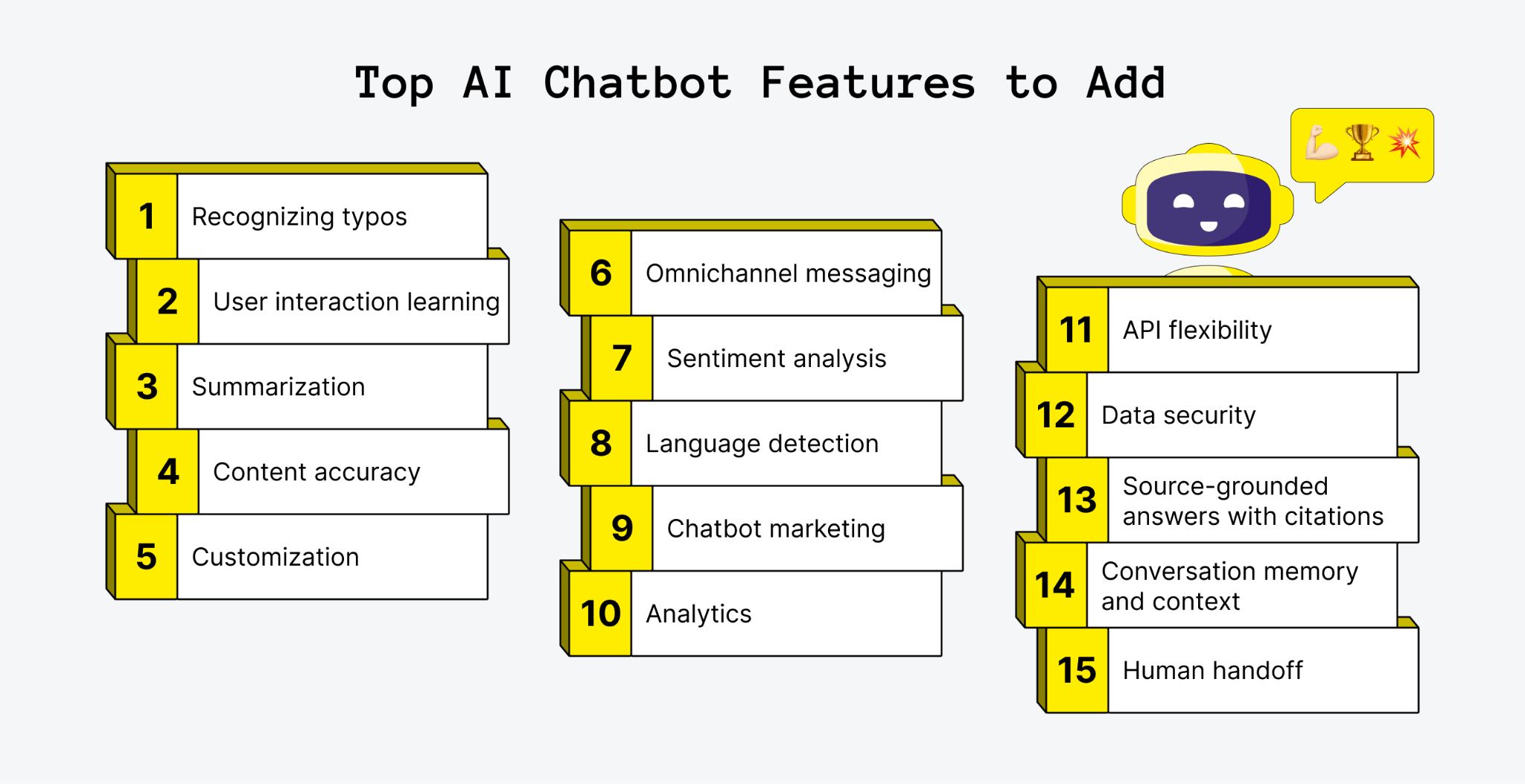
Recognizing Typos
AI chatbots need to be sharp enough to catch and correct typos and grammar slips to keep the conversation smooth. Unlike those old-school bots that get stumped by misspellings, modern AI chatbots must get the gist of your message. So, if you type “where my refunnis” instead of “Where is my refund?”, the chatbot must figure it out and give you the right info.
User Interaction Learning
The more you interact with these chatbots, the smarter they get. They learn from every chat, fine-tuning their responses and spotting trends. This means fewer canned replies and more spot-on answers. Plus, you can use this data to create handy tutorials or fun, gamified content to tackle common questions.
Summarization
Got a long-winded question? No problem. Advanced AI chatbots can sum up detailed queries, pulling out the main points to respond faster and more effectively. This not only speeds up problem-solving but also frees up human agents to tackle trickier issues.
Content Accuracy
A reliable chatbot should provide accurate, up-to-date answers and acknowledge when it doesn't have enough information to respond confidently. This is particularly important in customer support, where incorrect answers can undermine trust. According to Gartner's survey, 64% would prefer that companies didn't use AI for customer service. This highlights why chatbot quality, transparency, and reliable escalation matter as much as automation.
Customization
Every business is unique, and your chatbot should be too. Customizable chatbots can be tailored to use your industry’s lingo and address your specific queries. This flexibility ensures your chatbot evolves with your business and is a hack on how to create an AI chatbot that’ll last.
Omnichannel Messaging Capabilities
A seamless experience across all your communication channels is a must. Whether it’s your website, WhatsApp, or Facebook Messenger, your chatbot should remember past interactions to prevent customers from repeating themselves, to make the whole experience smoother and to reduce customer churn.
Sentiment Analysis
Chatbots with sentiment analysis can gauge customer emotions and tailor their responses accordingly. This makes conversations feel more personal and helps route frustrated customers to human agents for a quick resolution. Simultaneously, it may provide more emotional insights about your audience.
Language Detection
Support your global customer base with multilingual chatbots. These bots can detect and respond in different languages enhancing customer relationships and delivering a more personalized experience.
Chatbot Marketing Capabilities
AI chatbots aren’t just for support, they’re marketing team players too. They can inform customers about promotions, deals, and personalized suggestions or subtly nudge them towards valuable products and boost conversion rates.
Analytics
Keep tabs on your chatbot’s performance with detailed analytics. Monitor key performance metrics like user count, fallback rate, and interaction rate to optimize your chatbot for better results.
API Flexibility
Connect your chatbot with other business applications like CRM software through APIs. This integration improves workflows and makes your chatbot more effective in handling complex queries.
Data Security
Last but not least, protection. Ensure your chatbot has end-to-end encryption and customer authentication features to guard against threats like malware and DDoS attacks, especially when dealing with sensitive information.
An impressive list of unused opportunities, right? Now you have a grasp of the possibilities you’ll obtain if you decide to integrate the chatbot into your business. Next on the list is a step-by-step guide on how to build an AI chatbot.
Source-Grounded Answers With Citations
AI chatbots can retrieve information from trusted documents, product manuals, and knowledge bases, then provide answers with links or citations to the original sources. This helps users verify information and makes responses more transparent, especially in customer support and internal knowledge management.
Conversation Memory and Context
Conversation memory allows a chatbot to use details from previous messages to maintain context throughout an interaction. Instead of asking customers to repeat information, it can refer to earlier questions, remember relevant preferences, and provide more consistent responses. Depending on the application, memory may include recent messages, conversation summaries, or selected user preferences.
Human Handoff
AI chatbots should recognize when a request requires human assistance and transfer the conversation to a support agent. A smooth handoff preserves the conversation history and relevant details, so customers don't have to explain the issue again. This is particularly important for complex, sensitive, or unresolved requests.
How to Build an AI Chatbot from Scratch in 6 Steps
Finally, we came to a comprehensive step-by-step guide on how to create an AI chatbot. As a bonus, it also contains the best practices, tips, and some actionable recommendations for anyone who steps on the path of building an AI chatbot.
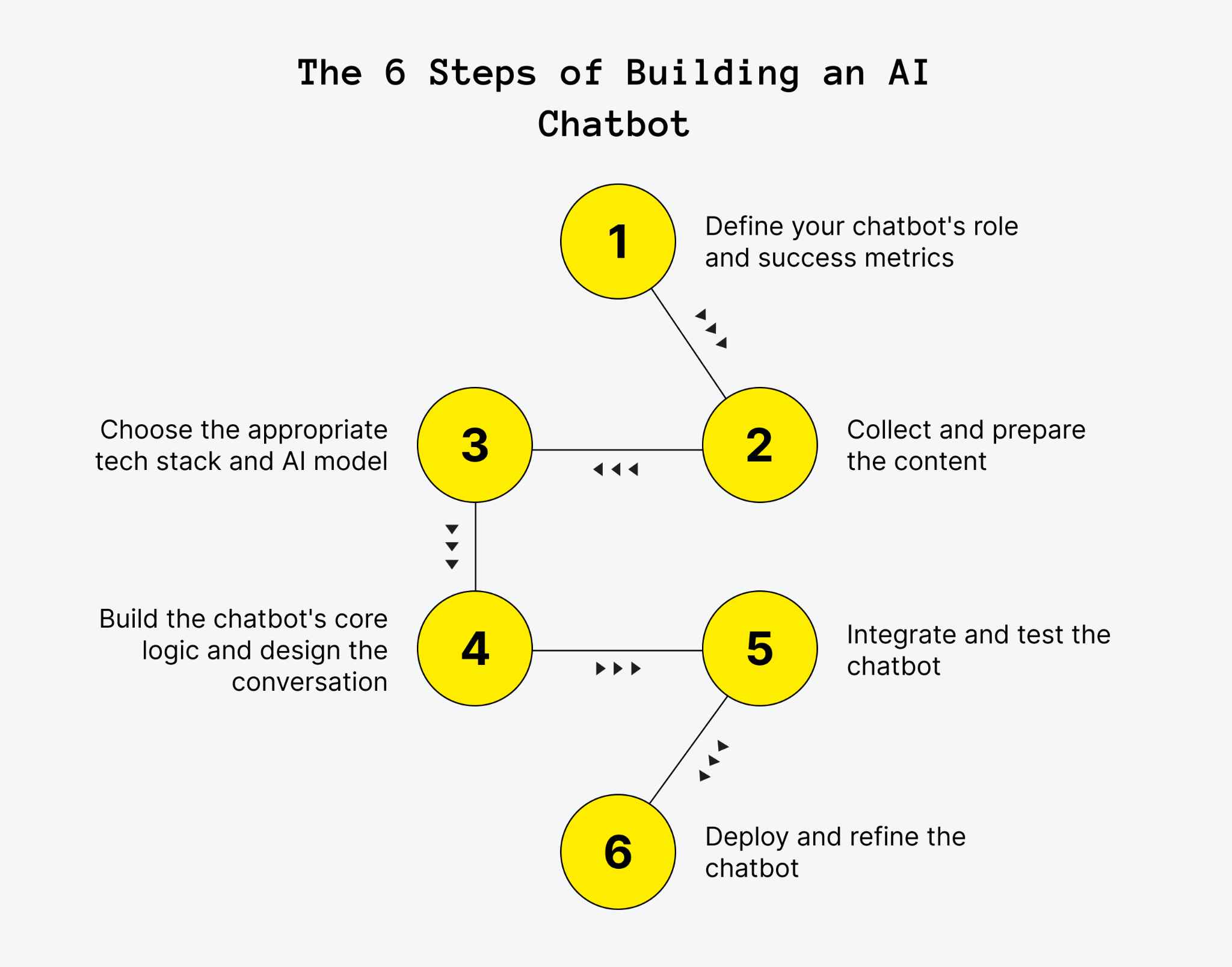
1. Define Your Chatbot's Role and Success Metrics
Before you start building an AI chatbot, define what it should do and who will use it. A specific goal, such as answering billing questions for existing customers, is much easier to build and evaluate than a broad objective like improving customer support.
Identify the core functions, prioritize them based on user needs, and choose measurable KPIs. These might include answer accuracy, response time, customer satisfaction, or the percentage of conversations resolved without human assistance. It's also worth selecting a deployment channel early, whether that's a website widget, a mobile app, or a messaging platform such as WhatsApp.
Industry-specific requirements should be considered from the beginning, too. For example, healthcare chatbots handling protected health information in the US must account for HIPAA requirements, while services operating in the EU need to consider applicable data protection and AI transparency rules.
Pro Tips:
- Understand user needs: Talk to your target audience through surveys, interviews, or focus groups to identify common questions, pain points, and expectations.
- Set measurable objectives: Define your OKRs and KPIs to evaluate the chatbot's performance, including resolution rates, response accuracy, and customer satisfaction.
- Prioritize core functions: Use feature prioritization to focus on the capabilities that address the most important user needs and align with your business goals.
- Check regulatory requirements: Identify applicable regulations, such as GDPR or HIPAA, before deciding how the chatbot will collect, process, and store user data.
2. Collect and Prepare the Content
Gather the information the chatbot will use to answer questions. Depending on its purpose, this could include help-center articles, product documentation, FAQs, internal policies, or customer support records.
Before using these materials, remove outdated information, resolve contradictions, and fill gaps in the documentation. The quality of the source content directly affects the relevance and reliability of the chatbot's answers.
If the bot needs to answer questions about a large collection of documents, consider retrieval-augmented generation (RAG). This approach retrieves relevant passages from a knowledge base and supplies them to the language model as context, helping ground responses in the information available to the business.
Pro Tips:
- Audit your existing content: Review documentation and support tickets to identify frequently asked questions and areas where information is missing or outdated.
- Organize the knowledge base: Group content into clear categories and prepare documents for retrieval so the chatbot can find relevant information efficiently.
- Keep information consistent: Remove duplicate or contradictory instructions that could lead to conflicting answers.
- Protect sensitive data: Apply appropriate access controls and data-handling practices, especially when working with personal or confidential information.
3. Choose the Appropriate Tech Stack and AI Model
The right technology stack depends on the chatbot's complexity, expected traffic, budget, and integration requirements. For many projects, using an existing LLM through an API is a practical starting point. A custom-trained model may be worth considering when the use case requires specialized behavior that existing models cannot deliver adequately.
Popular options include:
- LLM providers: OpenAI, Anthropic, and Google offer models that can generate natural-language responses and interpret user requests.
- NLP libraries: spaCy and NLTK support traditional natural language processing tasks.
- Machine learning frameworks: PyTorch and TensorFlow are useful for developing and training custom models.
- Chatbot platforms: Rasa and Botpress provide tools for conversation management, integrations, and deployment.
- Backend and database technologies: These handle business logic, user sessions, conversation history, and data storage.
Choose the model based on test results rather than reputation alone. A smaller, less expensive model may be sufficient for straightforward questions, while more complex tasks might require a more capable option. Scalability, security, latency, and operating costs should also factor into the decision.
Pro Tips:
- Start with an existing model: An LLM API combined with retrieval is often a practical starting point for a business chatbot, without the expense of training a model from scratch.
- Compare models on real tasks: Test several options against representative user questions to assess accuracy, response quality, latency, and cost.
- Plan for scalability: Choose technologies that can accommodate growing traffic without requiring a complete rebuild.
- Prioritize security: Check how providers handle submitted data, and select appropriate authentication, encryption, and access controls.
4. Build the Chatbot's Core Logic and Design the Conversation
Once the technology is selected, configure how the chatbot interprets requests, retrieves information, and generates responses. This includes writing system prompts that define its role, scope, tone, and limitations.
If the chatbot uses RAG, connect it to the prepared knowledge base and instruct it to rely on retrieved content when answering factual questions. It should acknowledge uncertainty rather than invent information when the available sources don't support an answer. Source-grounded responses with citations can also help users verify important claims.
Next, design the conversation itself. Map out the greeting, clarifying questions, follow-up responses, and fallback messages for situations the chatbot cannot handle. Conversation memory can help it maintain context across multiple messages, while clear guardrails can reduce irrelevant, unsafe, or out-of-scope responses.
It's also important to plan for human handoffs. For example, the chatbot could transfer a conversation when a user requests a person, repeatedly receives unhelpful answers, or raises a sensitive issue. Passing the conversation history to the human agent helps avoid making the user repeat information.
Pro Tips:
- Write clear system prompts: Define the chatbot's role, intended audience, response style, and boundaries, including what it should do when it lacks sufficient information.
- Design user-friendly conversations: Aim for a natural, intuitive experience and use plain language rather than complex terminology or niche startup jargon.
- Visualize conversation flows: Use MVP tools, such as Miro or Lucidchart, to map common scenarios, follow-up questions, and alternative conversation paths.
- Prepare fallback and handoff rules: Set clear conditions for asking clarifying questions, acknowledging uncertainty, or transferring a conversation to a human agent.
5. Integrate and Test the Chatbot
Integrate the chatbot into the selected channel and connect it to any systems it needs, such as a CRM, support platform, or product database. Then test it against realistic user questions before making it widely available.
A useful starting point is a test set of 100 to 200 real questions, where possible drawn from support tickets and paired with verified answers. Evaluate the chatbot's accuracy, relevance, ability to follow instructions, and handling of questions outside its knowledge base. Include ambiguous requests, unexpected inputs, prompt injection attempts, and scenarios that should trigger human handoff.
Automated testing can help catch regressions, while user acceptance testing reveals issues that scripted tests might miss. Security and privacy checks are equally important, particularly when the chatbot processes personal or confidential information.
Pro Tips:
- Test realistic scenarios: Include common questions, ambiguous requests, edge cases, and queries the chatbot should not answer.
- Use automated testing: Tools such as Botium can help simulate conversations and identify regressions.
- Conduct user acceptance testing: Ask real users to try the chatbot and provide feedback on usability, relevance, and response quality.
- Check security and privacy: Test access controls, data handling, and resistance to prompt injection and other attempts to bypass the chatbot's instructions.
6. Deploy and Refine the Chatbot
Rather than releasing the chatbot to everyone at once, consider starting with a small share of users or a limited group. This makes it easier to identify problems and assess performance before expanding access.
After launch, monitor the KPIs established in the first step. Review conversation logs, identify unanswered questions, collect user feedback, and look for recurring failures. Use these findings to improve source content, adjust prompts, refine retrieval, and update conversation flows. Analytics dashboards and data visualization can help track performance metrics and identify trends.
Model fine-tuning or retraining may be useful when the chatbot needs capabilities that prompt and knowledge-base improvements cannot provide. However, not every chatbot needs continuous model training. Regular evaluation, content maintenance, and software updates are often sufficient to keep a retrieval-based chatbot useful and reliable.
Pro Tips:
- Monitor performance metrics: Track resolution rates, response accuracy, response times, user satisfaction, and the frequency of human handoffs.
- Collect user feedback: Use surveys and feedback options to discover where the chatbot falls short of user expectations.
- Update the knowledge base: Add missing information, correct outdated content, and review recurring questions that the chatbot cannot answer.
- Improve incrementally: Test changes to prompts, retrieval, and models against your evaluation set before rolling them out to all users.
- Plan ongoing maintenance: Assign responsibility for monitoring, troubleshooting, security updates, and performance reviews.
A successful AI chatbot is not a one-time development project. It's an ongoing process of testing, learning from real conversations, and making targeted improvements as user needs evolve.
How Much Does It Cost to Build an AI Chatbot?
Building an AI chatbot costs anywhere from a few hundred dollars a month on a no-code platform to $250,000 or more for a custom enterprise agent. Most custom AI chatbots that answer from a company's own content land between $30,000 and $120,000. Three things set the price: how much the bot does, how many systems it connects to, and how strict your data and compliance requirements are.
The build is only half the budget. After launch, you pay for model usage, hosting, monitoring and maintenance every month. Plan for both numbers from the start.
AI Chatbot Development Cost by Type
The cost of building an AI chatbot depends on its complexity, data sources, and integration requirements. The table below compares four common approaches, from no-code setups to custom AI agents, along with their typical budgets and development timelines.
The main takeaway is that chatbot development costs vary significantly depending on what the bot needs to do. A no-code solution may be enough for answering basic FAQs, while a rule-based bot offers more control over predefined conversation flows. If the chatbot needs to understand natural language and answer questions using company documents, a RAG-based solution is often a more suitable option, though it requires a larger budget and more development time. AI agents that perform actions across business systems typically cost the most because they involve additional integrations, security measures, and testing.
These figures are estimates rather than fixed prices. The final budget depends on the scope of the project, the quality of existing data, the number of integrations, and the level of customization required. Defining the chatbot's core functions early can help keep the initial investment manageable while leaving room to expand its capabilities later.
How Much Does an AI Chatbot Cost to Run?
Building a chatbot is only part of the investment. Once it's live, you'll also need to account for model usage, hosting, maintenance, knowledge-base updates, and human support for conversations the bot cannot resolve. The table below breaks down the main operating expenses and their typical costs.
Running costs for a custom AI chatbot typically range from $1,000 to $10,000 per month, depending on usage, infrastructure, and maintenance needs. For example, a $90,000 chatbot could cost around $4,900 per month when the initial investment is spread over three years and ongoing expenses are included. To estimate your total budget, account for both development and recurring costs, as these can increase with traffic, integrations, and support requirements.
Build or Buy: When Does a Custom Chatbot Pay Off?
No-code and help-desk platforms charge per AI conversation or resolution, not per token. Tidio's Lyro costs about $0,58–0,65 per conversation. Intercom's Fin costs $0.99 per resolved outcome. Zendesk charges $1,50–2,00 per automated resolution above the plan allowance.
At 10,000 conversations a month, that adds up to roughly $5,800–20,000 a month in AI fees. The same volume costs $22–880 in raw model tokens on a custom build, plus its fixed running costs. As we see from that estimate, the break-even point is about 2,600–10,000 AI conversations a month. Below that range, buying is usually cheaper. Above it, or when the chatbot is your product or compliance rules out third-party tools, a custom build tends to pay for itself.
Ways to reduce AI chatbot development costs:
- Start with an MVP. Launch a single use case on one channel, measure containment and customer satisfaction, then expand. A production-ready MVP of typical scope usually takes 2–4 months to build. A full enterprise rollout takes considerably longer.
- Route by difficulty. Send routine questions to a small, cheap model and escalate complex ones to a larger model or a human.
- Cache and trim context. Cache the system prompt and retrieve only the most relevant passages instead of whole documents.
- Use batch processing for non-real-time jobs such as summarizing tickets or tagging conversations. Both OpenAI and Anthropic discount batch requests by 50%.
- Prepare your knowledge base first. Clean, current help content cuts development time and reduces the wrong answers that drive escalation costs.
AI Chatbot Examples: What Worked and What Failed
Real deployments show that AI chatbots work best for high-volume, repetitive questions. They fail when companies remove the human backup, skip guardrails or assume the bot isn't their responsibility. The four cases below cover one well-known success and three public failures, and each one carries a lesson you can apply before launch.
Klarna: Big Gains, Then a Course Correction
Klarna's AI assistant handled two-thirds of the company's customer service chats in its first month. Klarna reported that the assistant resolved issues in under two minutes, compared with 11 minutes previously, with customer satisfaction on par with human agents.
However, in 2025, CEO Sebastian Siemiatkowski acknowledged that prioritizing efficiency had affected service quality. Klarna subsequently moved toward a more balanced approach, bringing human agents back into the picture.
Lesson: AI can handle repetitive inquiries efficiently, but human support should remain available for complex issues and customers who need it.
Air Canada: The Company Owns What the Bot Says
Air Canada's website chatbot gave a passenger incorrect information about bereavement discounts. When the airline refused to honor the advice, the dispute went to British Columbia's Civil Resolution Tribunal, which ordered Air Canada to pay the difference.
Lesson: A chatbot's answers can have real financial and legal consequences. Ground responses in approved, up-to-date policies and test high-stakes questions carefully.
DPD: One Update, One Viral Screenshot
After a system update, DPD's customer service chatbot swore at a customer and criticized the company when prompted. Screenshots quickly went viral, and DPD disabled the AI functionality while addressing the issue.
Lesson: Test chatbot behavior after every significant model or prompt update. Clear instructions and output safeguards help prevent inappropriate responses from reaching customers.
Chevrolet of Watsonville: Prompt Injection in Public
Users of a California dealership's AI sales chatbot manipulated it into agreeing to sell a new Chevrolet Tahoe for $1 and generating unrelated content. Although no vehicle was sold at that price, the exchange attracted widespread attention.
Lesson: Define what the chatbot can discuss and which commitments it can make. Test it against prompt injection attempts that try to override its instructions or push it beyond its intended role.
Mistakes That Make AI Chatbots Fail
These cases reveal several recurring problems businesses should address before launch:
- No human handoff: Customers get stuck, and satisfaction drops. Gartner found that customers' top concern about AI in service is that it will be harder to reach a person.
- Ungrounded answers: The bot invents information instead of relying on approved company content.
- Missing guardrails: The chatbot makes inappropriate statements or promises it cannot fulfill.
- Insufficient testing: Real customer questions and adversarial prompts aren't tested before release or after updates.
- No clear ownership: Nobody is responsible for reviewing failed conversations and keeping the knowledge base current.
Most of these risks can be reduced during development. Clear escalation rules, reliable source content, well-defined chatbot boundaries, and regular testing help businesses avoid preventable failures while still benefiting from automation.
Seeking help with building your product?
Upsilon has an extensive talent pool made up of experts who can help bring your AI ideas to life!
Final Thoughts on Building an AI Chatbot
Creating an AI chatbot takes careful planning, the right technology, and ongoing testing. From defining its role and preparing reliable data to setting guardrails and monitoring performance after launch, every step helps create a chatbot that delivers real value. Understanding how to make an AI chatbot starts with choosing a clear use case, focusing on what users actually need, and improving the solution based on real conversations rather than trying to build every feature at once.
It's also important to look beyond development costs and timelines. A successful chatbot needs reliable source content, clear boundaries, a smooth way to hand conversations over to human agents, and regular performance reviews. Starting with a focused set of features makes it easier to validate the idea, manage the budget, and decide which capabilities are worth adding next.
If you're ready to explore chatbot development but aren't sure where to start, Upsilon can help you navigate the technical side of the process. Our team provides team augmentation services to support product development with the expertise your project needs, from selecting the right technologies to implementing and refining AI functionality. Feel free to get in touch to discuss your goals, technical requirements, and the right approach for your AI chatbot.



FAQs
How much does it cost to build an AI chatbot from scratch?

A custom AI chatbot built on an existing large language model costs $20,000 to $80,000 and takes 6 to 12 weeks. A chatbot that takes actions in other systems, like issuing refunds or booking appointments, costs $50,000 to $150,000. A chatbot built on a fine-tuned or custom model runs $80,000 to $300,000.
Running costs come on top: model usage billed per token, hosting, and monitoring.
Can I make my own AI chatbot for free?
Yes, for a prototype. No-code builders and the free tiers of AI platforms let you connect a model to a few documents and test a chatbot without writing code.
A production chatbot for customers costs money to run, since model providers bill per token and you need hosting, monitoring, and someone to review wrong answers. Treat a free build as a way to test the idea before paying for a real one.
How long does it take to build an AI chatbot?
A basic chatbot on a no-code builder can go live in a few days.
A custom chatbot built on a large language model, with retrieval from your own content, a human handoff, and testing, takes 6 to 12 weeks. A chatbot that acts on other systems takes 2 to 4 months, because each action needs permissions, error handling, and testing for the ways it can go wrong.
What programming language is best for building an AI chatbot?
Python and JavaScript, with TypeScript, cover most AI chatbot builds.
Python has the deepest set of AI libraries, including LangChain and LlamaIndex, and suits the backend that calls the model and searches your content. JavaScript and TypeScript suit the chat interface and teams already building web products in Node.js.
The model provider's API works the same from both, so the language your team already ships in is usually the most practical choice.
Is it hard to make an AI chatbot?
Getting a demo to answer questions is the quick part: a developer can connect a model to a set of documents in a day.
The hard part is making the chatbot reliable for real customers. That means answering only from approved content, admitting when it doesn't know, handing off to a person at the right moment, and catching wrong answers before customers repeat them.
Most of the 6 to 12 weeks go there.
Is ChatGPT a chatbot or an AI agent?
ChatGPT started as a chatbot: a conversational interface on top of OpenAI's large language models that answers questions in text.
It now also works as an agent in some modes, meaning it can browse the web, run code, and complete multi-step tasks with tools. The same split applies to a chatbot you build: one that only answers is a chatbot, and one that takes actions in other systems is an agent.
to top