How to Integrate ChatGPT into an App: All You Need to Know


Imagine your app coming with a built-in assistant that never sleeps. It answers questions instantly, writes personalized emails, and even helps users fix problems on their own. That's the reality for thousands of companies that have already gone through ChatGPT integration. Just over three years after launch, the platform now counts 5.7 billion monthly visits.
Business leaders caught on to AI's cost-cutting potential fast, and ChatGPT has been at the center of that shift. A striking 92% of Fortune 500 companies have already built OpenAI’s products into how they operate, with recognizable brands like Coca-Cola, Shopify, Snapchat, PwC, Quizlet, Canva, and Zapier among those leading the charge. Small businesses are about to get their own piece of the pie as well thanks to a special program, built specifically to help entrepreneurs automate their day-to-day work and grow without needing a big team or budget behind them.
All this points to one thing: ChatGPT can reshape how you talk to your users, making every interaction feel quicker and more natural. The real question is how to integrate ChatGPT into an app the right way. That means thinking about pricing, building solid API management, and making sure data stays secure throughout. It's a fair amount to plan for, but this guide lays out everything needed to integrate ChatGPT successfully, step by step.
Key Takeaways:
- ChatGPT lets your app answer questions, summarize content, and generate text in a natural, conversational way.
- The biggest wins are 24/7 support, lower cost per resolved ticket, personalized replies, and support volume that scales without new hires.
- Successful teams give ChatGPT one clear job and a human fallback, instead of trying to make it handle everything.
- Most problems come from poor planning: vague scope, exposed API keys, expensive models by default, no cost caps, and missing logs.
- A solid ChatGPT app integration follows five basics: get an API key, call the API from your backend, show replies in the UI, store conversation context, and test with limits before launch.
What Integrating ChatGPT into Your App Involves
ChatGPT runs on a large language model built by OpenAI, the same model family available through OpenAI's API. Adding it to your app means your backend sends a prompt, the user's message plus whatever conversation history you choose to include, to that API, and OpenAI returns a text response your app displays. None of this requires the user to leave your product or know they're talking to a model built by someone else, though disclosing it is worth doing regardless of whether your jurisdiction requires it yet. A growing number do.
The underlying model, currently OpenAI's GPT-5.6 family, is built on transformer architecture, the same approach behind every major large language model since 2017. In practice that means the model tracks context across a conversation rather than matching keywords the way older rule-based chatbots did. A follow-up question like "what about the cheaper one" resolves correctly if the user asked about pricing two messages earlier. That's the capability a founder pays for: an app that follows a conversation instead of matching keywords against a canned FAQ database.
Every message sent to the API, and every reply it returns, gets measured in tokens, roughly three-quarters of a word each. That unit matters later for cost planning, but the capability point matters first: the current model family reads up to about 1 million tokens of context in a single request, enough to hold a long conversation, or a full uploaded document, without losing track of details from earlier in it.
This is worth separating from a related but different idea: building an app that runs inside ChatGPT itself. OpenAI's Apps SDK, launched in 2025 and expanded through 2026, lets companies like Expedia, Canva, and Spotify build experiences users access from within ChatGPT directly. That's the reverse integration. We’re talking about a far more common case for an early-stage product: adding ChatGPT's capabilities to your own app, so your users never have to leave it.
Once the API call works, what it unlocks depends on how you use it. A chat interface is the obvious application, but the same call structure can also power:
- Document summarization: turning a long user uploaded contract into three key points.
- Structured data extraction: pulling a shipping address out of a free text message.
- Content generation: drafting a product description from a few input fields.
Anywhere your app currently relies on a rigid form, or on a search box that returns nothing useful when the query is vague, is a candidate for this kind of AI integration. The same groundwork applies whether you are asking how to integrate ChatGPT into an app specifically or how to integrate AI into an app more broadly: define the job, control the ChatGPT API cost, and keep a human in position to step in.
Key Benefits of Integrating ChatGPT into Your App
The reasons founders integrate ChatGPT come down to five recurring patterns, and the scale behind them is real: ChatGPT passed 900 million weekly active users by mid-2026, and big companies use its products in some form. That volume of adoption means users increasingly expect a fast, conversational answer instead of a support ticket queue.

1. Support That Doesn't Sleep
ChatGPT answers a user's question at 2 a.m. as competently as it does at 2 p.m., without a support team on call in every time zone your users are in. For products with a global user base, or no dedicated support staff yet, this closes a gap that would otherwise mean unanswered tickets overnight. A founder running a two-person team can offer the same first-response speed as a company with a night shift.
2. Lower Cost per Resolved Conversation
Teams that automate high-volume, low-complexity support with ChatGPT commonly report 20 to 30 percent lower operational support costs, since routine questions get resolved without a human touching them. A 2025 review of OpenAI-driven marketing and support tools found 67 percent of small businesses using them reported a measurable ROI increase. On a support team handling a few thousand monthly tickets, a 20 to 30 percent reduction runs into tens of thousands of dollars a year.
3. Replies That Use What You Already Know About the User
ChatGPT can reference a user's order history, past questions, or account details you pass into the prompt, so the reply sounds specific to that person instead of pulled from a generic FAQ. A returning user asking "where's my order" gets an answer with their actual order number and delivery estimate in it, not a link to a tracking page they have to search for themselves.
4. Support Volume That Scales Without Headcount
ChatGPT handles a thousand concurrent conversations the same way it handles one, so a spike in signups doesn't require a matching spike in support hires. A traditional support team scales roughly linearly with ticket volume; an AI-handled queue does not, which matters most in the exact weeks after a product launch or a press mention when volume is least predictable.
5. A Product That Improves Without a Rebuild
When OpenAI ships a better model, an app built on its API gets better replies the next time it calls that model, no new feature work required. Apps that called OpenAI's API without hardcoding assumptions about a specific model version saw measurably better replies the day GPT-5.6 shipped in July 2026, with no code changes on the app's side.
None of this replaces a human on a request that needs one. The mistakes section below covers where ChatGPT should stop and a person should take over.


How Expedia and Salesforce Use ChatGPT in Production
Many businesses are already using AI successfully. These companies didn’t simply add ChatGPT onto their platforms as a gimmick. Instead, they made it a part of the user experience and let it solve various user problems. Let’s look at two strong ChatGPT integration examples that show how it works in the real world.
Expedia
Expedia built ChatGPT into its own app for trip planning, replacing a search form with a conversation. Instead of filling in dates and destinations field by field, a user tells Expedia's assistant what kind of trip they want, and it returns options from a pool Expedia describes as 1.26 quadrillion possible combinations of flights, hotels, and activities. Expedia has since become a pilot partner in OpenAI's Apps SDK program too, alongside Booking.com, Canva, and Spotify, extending the same conversational planning experience into ChatGPT directly. As a result, Expedia reported that users spent longer planning because the process itself was more useful, more of those sessions converted to bookings, and fewer basic questions reached human support.
Salesforce
Salesforce took a different entry point. It first built ChatGPT into Einstein, its existing AI layer inside the CRM, so sales and support staff get AI-drafted emails, call summaries, and follow-ups without leaving the tools they already use. Salesforce has since folded that capability into Agentforce, its broader platform for AI agents that take action inside a company's CRM data rather than only generating text. The pitch for both versions is the same: a sales rep spends less time writing routine messages and more time on conversations that need a human's judgment, and support cases that used to take ten minutes to triage often resolve in the time it takes the AI to draft a response for a human to approve.
The common thread between Expedia and Salesforce is scope discipline. Neither company let ChatGPT handle everything. Both wired it into one clearly bounded job, trip planning for Expedia, drafting and summarizing for Salesforce, and built an escalation path for whatever the model handled poorly. Neither company built these features from scratch either; both connected to the same OpenAI API a founder building a much smaller product would use. The difference is scale, not access, which is the same discipline the mistakes section below argues for at MVP scale.
Seeking help with building your product?
Upsilon has an extensive talent pool made up of experts who can help bring your AI ideas to life!

Mistakes Founders Make Before They Integrate ChatGPT
Founders lose the most time and money on decisions made before a single line of the ChatGPT integration code gets written.
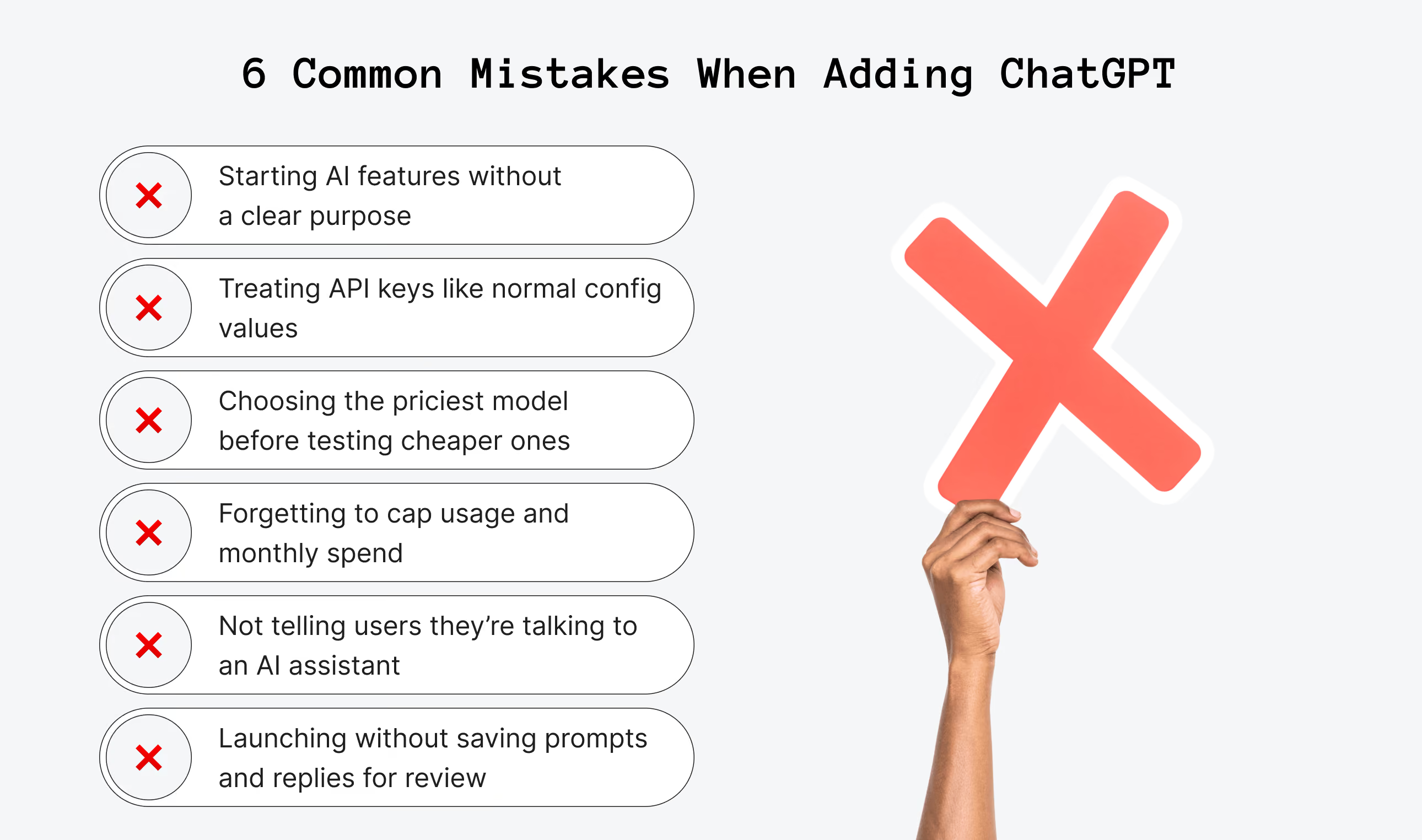
Mistake 1: “Add AI” Without a Clear Job
The first mistake is skipping a clear answer to what the feature is for. “Add AI” is not a scope. Customer support, content drafting, and personalized recommendations all require different prompts, different amounts of conversation history, and a different tolerance for a wrong answer.
A support bot that occasionally misunderstands a question is a minor annoyance. A feature that recommends the wrong dosage in a health app is not. Define the job before you pick a model, and write down what a wrong answer costs in your specific product before you decide how much testing is enough. A wrong answer to “what are your business hours” costs an annoyed user. A wrong answer to “am I eligible for a refund” can cost a support ticket, a refund you did not intend to honor, or both.
Mistake 2: Treating the API Key Like a Normal Setting
The second mistake is treating the API key like a normal config value. An OpenAI API key is closer to a password than a simple setting. It belongs in a backend environment variable or a secrets manager, never in client side code where a user’s browser can read it, and never in a public repository.
A leaked key can be used by someone else on your account, and you pay for their usage. If your first version came out of a vibe coding tool rather than a hand built backend, the usual gaps in a vibe-coded project are worth closing before a production API key touches that code.
Mistake 3: Defaulting to the Most Expensive Model
The third mistake is picking a model without testing cheaper ones first. OpenAI’s current lineup, the GPT 5.6 family launched in July 2026, spans three tiers. Luna, the cost efficient option, runs $1 per million input tokens and $6 per million output tokens. Terra, the balanced tier, runs $2.50 and $15. Sol, the flagship reasoning tier, runs $5 and $30.
OpenAI’s pricing page has the current numbers, and it is worth checking before you budget since these tiers are repriced regularly. Founders often default to the most capable model out of caution, then discover a support widget or a form filling assistant works fine on the cheapest tier. Review ChatGPT API pricing and test the inexpensive option first before you pay for the premium one.
Mistake 4: Launching Without a Cost Ceiling
The fourth mistake is skipping a real cost ceiling. OpenAI bills by usage, and a feature with no rate limit or budget cap can generate an unexpectedly large bill if a single user, or a script, sends thousands of requests in an afternoon.
Set a hard usage cap in the provider’s dashboard and a rate limit in your own backend before launch, not after the first invoice arrives.
Mistake 5: Hiding the Fact That It Is AI
The fifth mistake is not telling users they are talking to an AI. Beyond the ethical concern, undisclosed AI erodes trust quickly the first time it gets something wrong. Users forgive a labeled AI’s mistakes more readily than an unlabeled one’s, and a support widget that pretends to be human until it fails at something a human would not have failed at loses more trust than the mistake itself would have caused.
Mistake 6: Shipping Without Conversation Logs
The sixth mistake is shipping without logging what the model said. When a user reports that a reply was wrong or unhelpful, you need the exact prompt and response to understand why, not a secondhand description of what the user remembers.
Log conversations from day one, with clear disclosure and a data retention policy users can see. Do this before the first complaint arrives, not after you realize you have no record to investigate.
How to Integrate ChatGPT into Your App in 5 Steps
Now that you understand the key risks and decisions around ChatGPT API integration, it’s time to look at the simple steps your development team should follow to add it safely and efficiently.
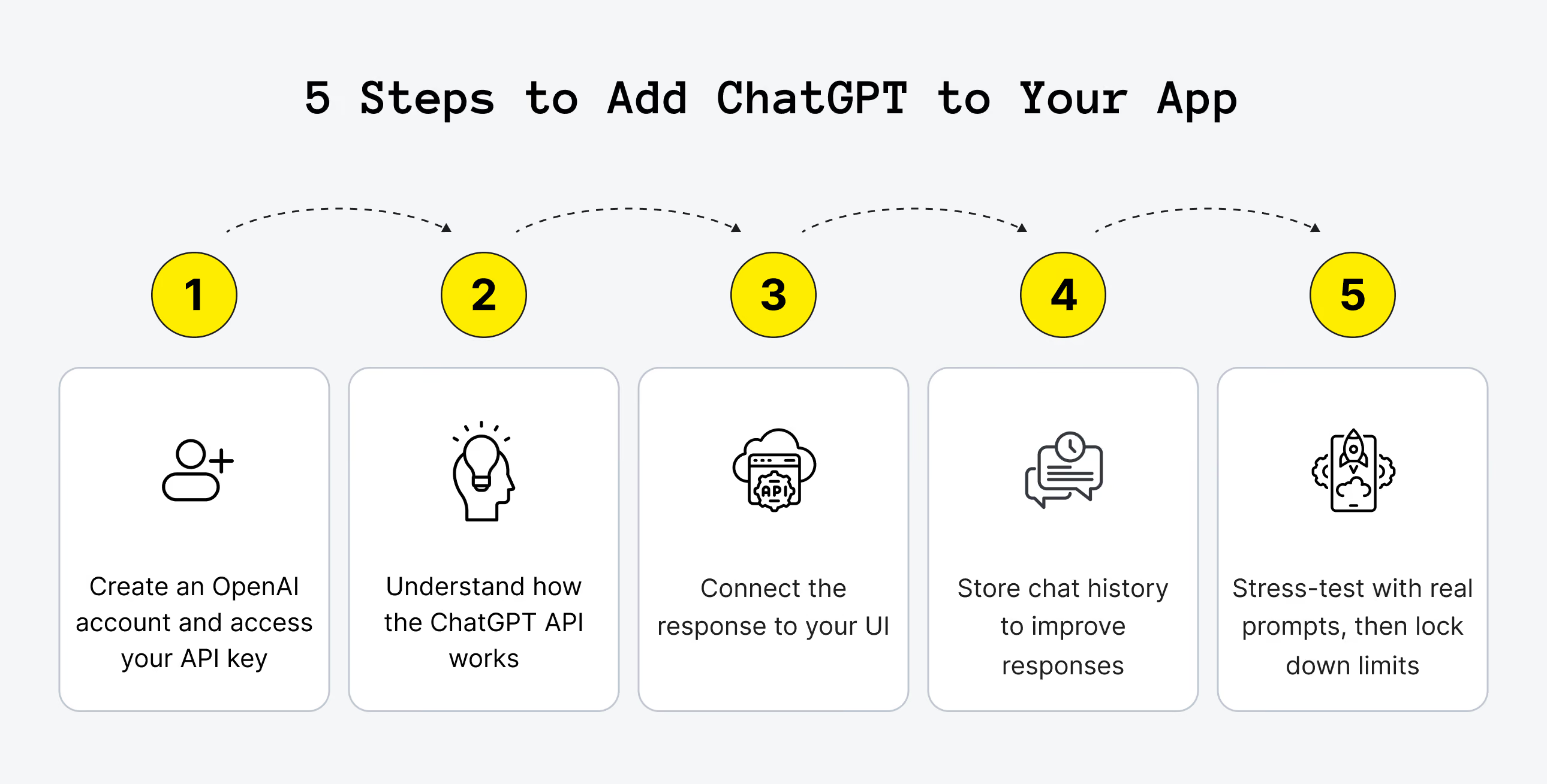
Step 1. Create an OpenAI Account and Generate an API Key
Sign up at OpenAI's developer platform, then open the API keys section and generate a new secret key. OpenAI shows the full key exactly once, so your developer copies it immediately into a secrets manager or environment variable rather than a notes file.
Step 2. Set up the Backend That Will Call the API
Your app's backend, not the user's browser, holds the API key and makes the request. It sends the user's message, and however much prior conversation you choose to include, and receives a text response back. OpenAI's documentation covers this for Python, Node.js, and most other common backend languages with working code samples.
Step 3. Wire the Response into Your Interface
The backend forwards OpenAI's reply to your frontend, where it renders in whatever interface you built: a chat window, an inline suggestion, a generated summary. This is standard frontend work; nothing about it is specific to ChatGPT.
Step 4. Store Conversation History for Context
ChatGPT has no memory between separate API calls. If you want it to reference earlier messages in the same conversation, your app stores that history, in the user's session or your database, and sends the relevant portion back with each new request. You decide how long to keep that history; OpenAI doesn't set a default retention window for you.
Step 5. Test With Real Questions, Then Set Limits Before Launch
Run the range of questions real users will ask, including the ones designed to break it: off-topic requests, attempts to extract your system prompt, and questions with no good answer. Add the rate limits and usage caps described in the mistakes section above before you open access to real traffic, not after. Only then does this move from a working demo to something production-ready.
Following this structured flow ensures that when you evaluate how to integrate ChatGPT into an app, your product stays secure, cost-effective, and capable of handling real-world user requests from day one.

Best Practices and Tips for Using ChatGPT in Apps
Integrating ChatGPT into your app will be more fruitful with these little success secrets.
- Make clear prompts. Your request must be understandable and precise if you want high-quality answers. The question or instruction you give to ChatGPT must be simple and actionable. Avoid vague or confusing questions, and help users to phrase their queries in a straightforward way.
- Let your users know they’re chatting with an AI. ChatGPT is very smart, but it will not always have perfect answers. This transparency reduces frustration if the AI can’t solve every problem.
- Set rules for ChatGPT. Don’t try to make ChatGPT do everything. Let it deal with what matters most for your app. It can be answering FAQs, writing product descriptions, or helping users plan something. Its role must be well-defined.
- Test and tune AI. Don’t leave ChatGPT on its own after the integration. Test different prompts, see how users interact, and make adjustments as you go. Even small changes can improve how the AI responds.
- Respect user privacy. Don’t collect or share sensitive information if your app cannot handle it safely. Be upfront about how data is used and protected. This approach builds trust.
- Control your costs. OpenAI charges based on usage (tokens), so set limits, monitor traffic, and use only what you need. It will help you avoid unexpected expenses.
- Design fallback options. You must have a backup when AI doesn’t respond well or gets it wrong. It can be a button to rephrase, a human handoff, or helpful links. It improves the experience and keeps users from getting stuck.
What to Do After Launch, and When Upsilon Can Help You
Launch is not the finish line after a successful ChatGPT integration. The prompts that worked during testing often drift once real users start asking questions you did not anticipate, so it is worth planning a review every few weeks based on actual conversation logs rather than assumptions about user behavior. Conversation threads where a user rephrases the same question twice usually indicate that the prompt needs attention more than the model itself.
Iteration belongs in the budget in the same way as any shipped feature that later gets refined. A model upgrade, a prompt rewrite, or a new fallback flow for situations where the AI cannot help are all normal parts of ongoing maintenance, not signs that the first build failed. Usage metrics deserve the same level of attention. A feature that costs only a few dollars per day during internal testing can easily climb into hundreds of dollars per day once real traffic arrives, and noticing that shift in the first week is far cheaper than discovering it on the invoice for month three.
A recurring calendar reminder to review conversation logs is more reliable than a mental note. Prompt drift tends to be gradual, and it is unrealistic to expect memory alone to catch it. Treating a feature that worked at launch as permanently stable, without checking six months later, is how issues stay invisible until a user raises a complaint.
For founders who already work with a developer or an in-house team, everything described above can be implemented directly using the provider’s documentation as a guide. For founders who do not yet have that team, or who prefer to have compliance and cost control handled by specialists, Upsilon’s generative AI development services focus on exactly this kind of work: matching the model to the use case, integrating it into the product, and putting the guardrails from this guide into practice as part of an MVP build.
Need a hand with generative AI development?
Upsilon is a reliable tech partner with a big and versatile team that can give you a hand with creating an AI solution.
Final Say on ChatGPT Integration
ChatGPT is changing the game for startups, opening up lots of new ways to improve how they work and connect with customers. By offering personalized support, helping with lead qualification, and making content creation easier, this smart AI tool helps startups work more efficiently, simplify processes, and grow faster.
To unlock these benefits, a smooth and effective integration process is key. That’s where Upsilon can make all the difference. If you’re ready to harness the potential of ChatGPT for your product’s success, contact the Upsilon team today and let’s bring your AI ambitions to life!
FAQ
1. How do I integrate ChatGPT MVP into an app?

Create an OpenAI account, generate an API key, and have your developer add a backend endpoint that sends user input to OpenAI and returns the model’s reply to your UI. For an MVP, most of the work is wiring this call into a simple interface and adding basic logging and limits. The step-by-step guide above covers the full sequence; most developers have a working version live within one to two weeks.
2. What can I integrate ChatGPT with?
Almost any app that involves text can use ChatGPT. It works great with websites, mobile apps, CRMs, collaboration tools, and SaaS platforms of all kinds. Most often, ChatGPT is used for AI chatbots for customer service, virtual writing assistants, automated QA tools, and even smart product recommenders.
3. How much does it cost to integrate ChatGPT into an app?
The integration itself is a few weeks of development time; the ongoing cost is usage-based API pricing. As of mid-2026, OpenAI's GPT-5.6 tiers run from $1 per million input tokens on the cheapest tier (Luna) up to $5 on the flagship tier (Sol), with output priced several times higher on each tier. A typical support widget runs fine on the cheaper tiers. Check OpenAI's pricing page for current numbers before you budget.
4. What are the challenges of integrating ChatGPT into an app?
Key challenges are keeping costs under control, handling occasional wrong or misleading answers, dealing with latency and API errors in production, protecting API keys and user data, and designing a clear UX that tells users they’re talking to AI and gives them an easy way to escalate to a human when needed.
5. How is integrating ChatGPT different from building an app inside ChatGPT?
Integrating ChatGPT means adding OpenAI's API to your own product, so your users interact with the AI without leaving your app. Building an app inside ChatGPT uses OpenAI's separate Apps SDK, where your product becomes a feature users access from within ChatGPT itself. Most early-stage founders want the first one: it keeps users, and their data, inside your product.



to top