AI in SaaS: Applications, Integration Methods, and 2026 Trends

AI is no longer a feature SaaS companies can treat as optional. In 2026, strong products use it to reduce routine work, surface useful information at the right moment, and help customers move through complex tasks with fewer steps. McKinsey’s 2026 global survey found that nearly 9 in 10 organizations regularly use AI in at least one business function, and 44% are scaling it across the enterprise.
AI-powered analytics is a clear example. Instead of manually filtering dashboards and reports, teams can ask questions in plain language, spot anomalies, and receive context-aware recommendations. Personalization is evolving in the same direction: rather than simply suggesting content, AI can adapt onboarding, workflows, and in-app guidance to each user’s role, behavior, and goals.
For SaaS companies, the focus in 2026 is not simply adding AI to a roadmap. It’s building features that solve real user problems, fit naturally into the product, and deliver results that can be measured. Let's explore AI applications in SaaS, integration methods, and the trends shaping the market in 2026.
Key Takeaways
- AI in SaaS is most valuable when it solves a clear customer problem, such as manual reporting, slow support, repetitive data entry, or difficult information searches.
- Common SaaS AI use cases include personalized experiences, conversational support, content generation, translation, predictive analytics, security monitoring, and cloud optimization.
- Most products can start with a third-party AI API or by connecting an existing model to product data; custom model training is usually unnecessary at an early stage.
- AI SaaS pricing often requires a hybrid or usage-based approach because inference costs grow with prompts, documents, requests, and agent actions.
- Data privacy, security, bias, output quality, and scaling costs need ongoing attention, not just a one-time review before launch.
- The best first AI feature is the one that removes an already visible user pain point and produces a measurable outcome for both customers and the business.
What Is AI in SaaS?
AI in SaaS means that subscription software can do more than store data or follow fixed rules. It uses technologies such as machine learning, natural language processing, or generative AI to analyze information, make predictions, and help users take the next step.
For example, a CRM that saves call notes is a standard SaaS product. But if it can transcribe a call, write a follow-up email, and warn that a deal may be at risk, it uses AI. The software is not just recording information. It’s analyzing the context and making suggestions that would otherwise require a sales representative’s time.
The same applies to project management tools. Setting a deadline is a regular feature. Predicting that a task may miss its deadline by comparing it with similar past tasks is an AI capability. The prediction can change when new data appears, such as a delayed dependency or a change in workload.
This difference is important because many products are called “AI-powered” even when they only use basic automation. A menu that shows data from a database is not AI. Neither is a chatbot that follows a prewritten script based on keywords. Real Saas AI can adapt its output to new information instead of applying the same rule every time.
An AI-powered SaaS product doesn’t need to automate everything. Even one useful AI feature, such as predicting risks, summarizing information, or recommending the next action, can make the product AI-enabled. What matters most is that the feature solves your customers’ problems and provides value.
The AI SaaS Market in 2026: Adoption, Revenue, and Pricing
The global AI SaaS market is growing up fast. Valued at $22.5 billion in 2025, it’s expected to reach $31.1 billion in 2026 and grow to $256.8 billion by 2033, with a projected CAGR of 35.2% over the 2026–2033 period. The reason is simple: companies no longer see AI as an experimental feature. They are looking for software that helps employees work faster, makes complex data easier to use, and removes repetitive steps from daily workflows.
Adoption is Becoming Practical
For SaaS founders, this means the market is becoming more competitive, but also more practical. Generic chatbots alone are unlikely to stand out for long. The strongest AI-powered SaaS products apply AI to a specific problem: summarizing customer calls, extracting information from documents, identifying churn risks, routing support tickets, or helping users find answers without leaving the product.
According to the hy and OMR Reviews survey, 42% of software companies use AI primarily for internal processes and automation. Another 28% apply AI and ML in SaaS solutions without presenting it as a standalone feature, while 26% already sell AI-supported features or AI-based products. This is an important distinction: much of the value of SaaS AI is becoming invisible to the end user because it is built into the product rather than presented as a separate tool.
Revenue Needs Proof
The opportunity for AI SaaS revenue is real, but adoption doesn’t automatically create it. McKinsey reports that 80% of respondents say AI has improved individual productivity, and 50% say it helps them make better decisions. However, only 37% report that AI has had a positive impact on enterprise-level EBIT, while just 6% qualify as AI high performers that attribute at least 5% of EBIT to AI and report significant value.
For founders, this gap should shape the product strategy. A feature that produces impressive demos but doesn’t reduce work, improve decisions, increase conversion, or lower operating costs will be difficult to monetize. The strongest AI-powered SaaS products connect AI output to a measurable business result.
For example, an AI assistant that summarizes every customer call may be convenient. An assistant that identifies renewal risks, prepares a follow-up, and helps account managers act before a customer churns has a clearer link to revenue retention. The same logic applies to generative AI in SaaS development: code generation is valuable, but its business impact comes from faster delivery, fewer defects, or reduced development costs.
Pricing is Changing
Traditional SaaS pricing works well when each extra user adds little marginal cost. AI changes that equation. Each prompt, document analysis, agent task, or generation can create variable inference and infrastructure costs. A flat per-seat price may therefore become risky for the vendor, especially when a small number of power users consume most of the AI capacity.
The above-mentioned study shows that subscriptions remain the dominant model, used by 92% of surveyed software companies. But 37% already use usage-based pricing, and 59% combine more than one pricing metric. For future AI features, 69% of respondents said they would choose a usage-based model, compared with 37% for their current software offerings. This is one of the clearest AI SaaS trends for 2026: pricing is shifting from access to measurable consumption or value. Look at the following table:
The report’s practical conclusion is sensible: subscription pricing is not going away, but AI makes hybrid, usage-based, and outcome-based models more relevant. In other words, AI SaaS pricing should reflect both customer value and the cost of serving that customer.
The Benefits of Generative AI in SaaS Development
Today, generative AI development is changing how SaaS products are built, scaled, and optimized. Development time gets shorter and user experiences better. Basically, AI-driven SaaS is capable of making everything faster, smarter, and more cost-effective. Here's why SaaS AI is worth considering across sectors.

Faster Content Creation
Does your SaaS generate blog posts, product descriptions, or customer responses? Generative AI can create high-quality content in seconds. In 2026, 97% of marketers use AI-generated marketing materials to save time and focus on strategy instead of endless content creation.
More Revenue, Lower Costs, Better Output
As NVIDIA reports, companies are using AI to increase revenue, reduce operating costs, and improve employee productivity across industries. By moving beyond pilots to specialized, production-ready applications, they managed to streamline workflows, automate routine work, make better use of data, and focus more capacity on customer value, innovation, and new business opportunities.
Cleaner, More Reliable Code
AI-driven code generation tools like GitHub Copilot are making developers' lives easier. They write code and follow best practices, reduce errors, and ensure consistency at the same time. 72.6% of developers using Copilot code review said it improved their effectiveness. AI-assisted coding improves productivity, too. It means fewer bugs and faster rollouts. How can it be implemented in a SaaS product? Some data migration software companies, for example, make AI assistants solve issues based on the migration report.
Better Workflows and Smarter Automation
Since generative AI automates the workflows of teams and individual specialists, it can make the entire development cycle faster. Across projects running on CircleCI, the average number of workflows executed each day increased by 59% compared with the previous year.
More Time for Innovation
As you can see, AI takes care of routine things. This means the rest of the team can focus on what really matters. The more ambitious tasks may include building innovative features and keeping up with the latest tech trends. Instead of fixing minor UI issues, you can work on developing SaaS solutions that are groundbreaking and can change product development and customer experience.
Effortless Scaling as Demand Grows
As your user base expands, AI can make it easier to scale operations without missing a beat. The typical consequences of growing demand are more customer inquiries, vast amounts of data, or a higher need for cloud resources. AI can help scale without a proportional increase in costs or human workload.
All of these perks come from different company sizes, sectors, and use cases. Next, let's take a look at how you can use SaaS AI, and, maybe, something will resonate.
Need a hand with generative AI development?
Upsilon is a reliable tech partner with a big and versatile team that can give you a hand with creating an AI solution.

AI Applications in SaaS: Where It's Already Working
Automating workflows, improving user experiences, or enhancing security are just some of the capabilities of AI in SaaS. But there's more of what AI brings to the table.
Breaking Language Barriers with AI Translation
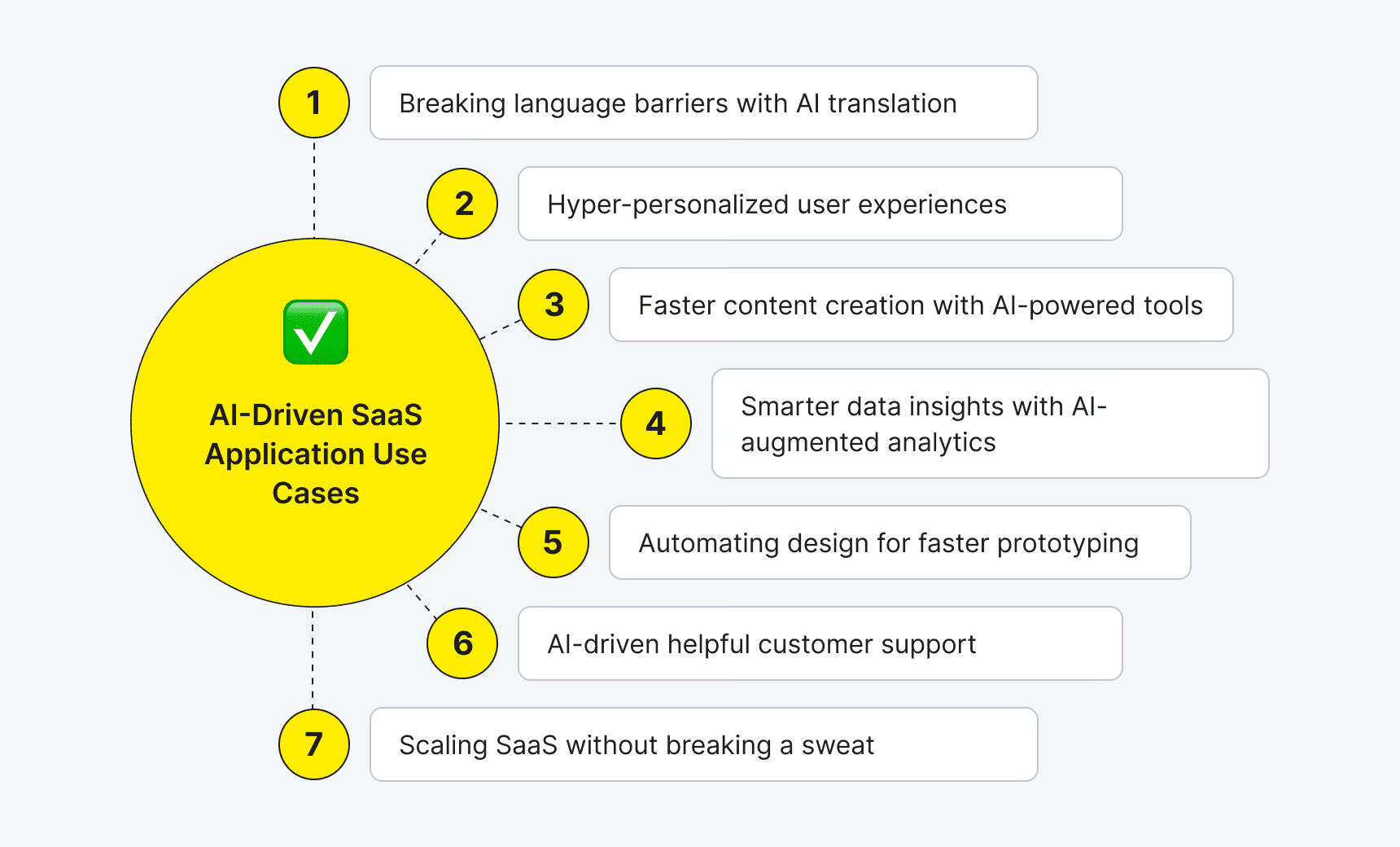
SaaS platforms are global, but language barriers can slow things down. Generative AI SaaS can give real-time translations and make cross-border collaboration easy. Food delivery apps like Glovo or accommodation search giants like Airbnb know this perfectly. They translate conversations between landlords and guests or shoppers and delivery guys in real-time.
Moreover, every SaaS that has messenger features and a globally distributed audience can benefit from this capability. Tools like Slack or Zoom also take advantage of AI-driven translation.
Hyper-Personalized User Experiences
Customers expect software that adapts to their needs and not the other way around. Gen AI analyzes user behavior and creates relevant recommendations, layouts, and features. The most basic example that probably hits home is how Netflix suggests your next binge-watch. Other AI SaaS products can do the same for workflows, dashboards, and even pricing models.
AI-Powered Content Creation (Minus the Writer’s Block)
Writing product descriptions, blog posts, and marketing copy can eat up time. Gen AI speeds up content creation without sacrificing quality. HubSpot and WordPress already use AI to generate content ideas, automate drafts, and optimize copy for engagement.
There are limitations to automated content generation that's why it's unlikely to replace content creation jobs any time soon. But when trained and tweaked correctly, various large language models can make things up, use relevant information, and not be generic. Such AI SaaS is best for relieving the routing rather than giving really unique creative ideas.
Smarter Data Insights with AI-Augmented Analytics
AI processes data and helps businesses make sense of it much faster than humans can do. Gen AI can create new datasets, predict trends, and uncover insights hidden in raw numbers. SaaS tools like Tableau and AnswerRocket use AI analytics to help companies make better, faster decisions without digging through spreadsheets for hours or even weeks and months.
Automating Design for Faster Prototyping
Not every SaaS team has an in-house designer, but AI can fill the gap. Adobe Firefly, Design.com, and Canva, for example, may help generate logos, UI elements, and marketing assets in seconds. So, today's design is way more accessible and efficient, even if you don't have a pro on your team.
AI-Driven Customer Support That Actually Helps
Gen AI chatbots can now handle routine support queries much better than they used to a couple of years ago. That’s why many are planning on building AI chatbots to handle queries. Zendesk's and Chatbase's bots answer FAQs, troubleshoot problems, and even detect customer sentiment to improve support quality.
Scaling SaaS Without Breaking a Sweat
As SaaS platforms grow, so do their challenges (more users, more data, and more complexity). AI makes scaling easier because it automates backend processes, predicts demand, and optimizes cloud resources. For instance, Dropbox’s Smart Sync prioritizes relevant files, and Oracle’s AI-driven security tools detect threats before they become a problem.
If you can already tell that artificial intelligence SaaS is something you need, take some time to explore how exactly it blends with your solution so you’re ready for the integration.


How to Integrate AI Into a SaaS Product: 3 Approaches
There are three main ways to integrate AI into your SaaS product. Each way has perks, cons, and costs. Like with other business decisions, the best approach depends on your goals, resources, and how much customization you need. We'll go through the options, noting the approximate costs and required generative AI tech stack.

Here is a quick comparison of the three approaches. Using it will help you match your AI feature with the right level of data access, customization, and investment before you start building.
Please note that most SaaS products can get meaningful results with the first two options. Training a custom model is rarely the right place to start, especially for an initial AI feature. So, which approach should you choose?
It depends on how much the feature needs to know about a specific user versus a general task. Third-party AI services are usually the fastest way to launch features such as translation, transcription, or sentiment analysis. Connecting AI to your SaaS data takes more setup, but it enables useful, personalized features such as reports, recommendations, and support responses based on a user’s actual activity.
Custom model training is best reserved for highly specialized, high-risk use cases where general-purpose models cannot provide the required accuracy, such as certain healthcare or financial workflows. It is also the most expensive and resource-intensive option, so most SaaS teams do not need it at an early stage. For data-aware AI features, choosing the right foundation model is especially important.
The goal is not to use the most advanced AI setup available. It’s to choose the simplest approach that solves a real user problem and expand only when the product and its requirements demand it. Now, let’s explore the key shifts shaping customer expectations, product decisions, and the market in 2026.

AI SaaS Trends for 2026
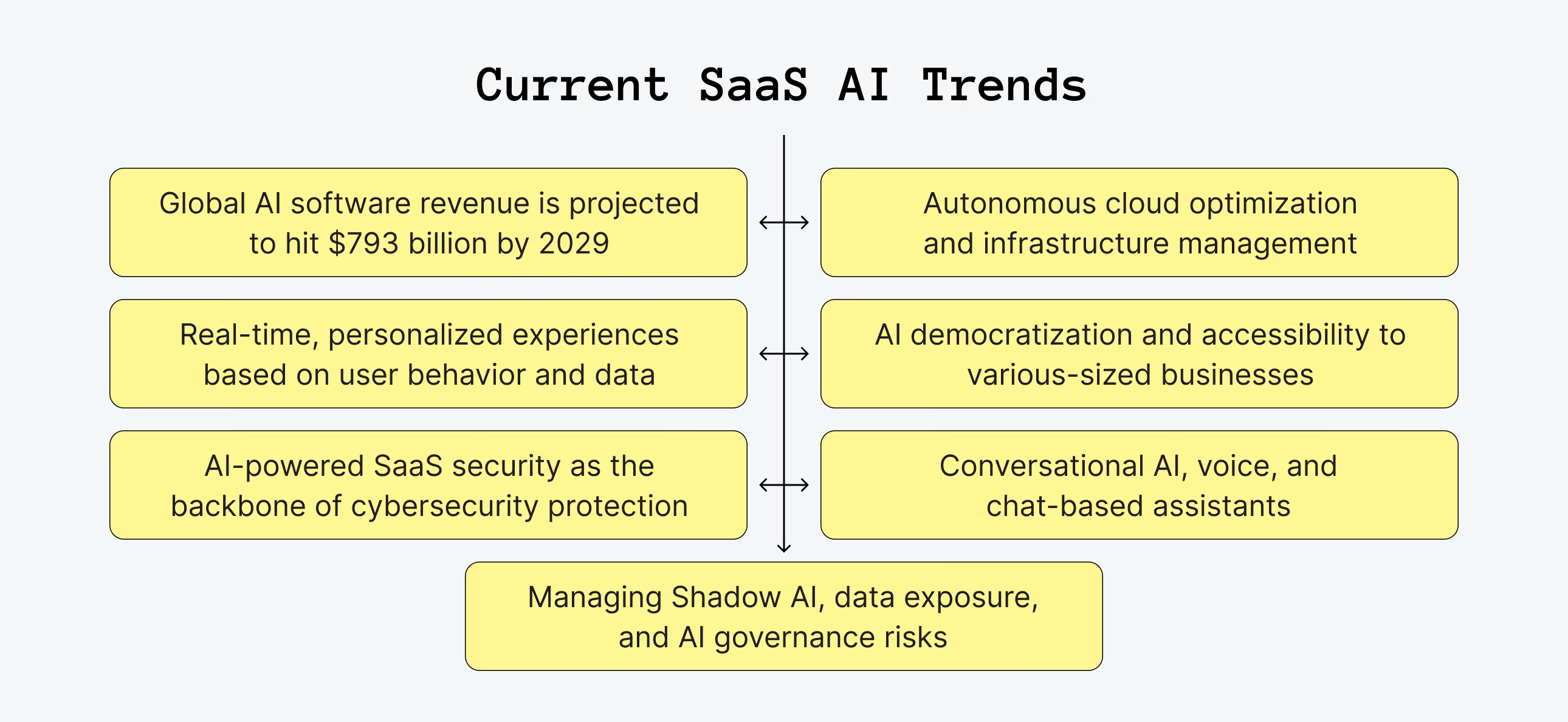
Global AI software revenue is projected to hit $793 billion by 2029, so it’s clear that AI-driven SaaS is here to stay. These six trends define today and tomorrow of AI in SaaS.
Hyper-Personalization at Scale
AI is moving beyond simple customization, and in 2026, AI SaaS platforms will deliver real-time, personalized experiences based on user behavior and data patterns. Expect smarter dashboards, predictive recommendations, and interfaces that adapt on the fly.
AI-Driven Security and Threat Detection
Cyber threats are evolving (as usual) that's why AI powered SaaS security will be the backbone of protection. These systems will detect anomalies, prevent breaches before they happen, and continuously learn to stay ahead of new threats, trying to understand cybercriminal minds from the inside.
Autonomous Cloud Optimization
Managing cloud infrastructure will become easier as AI automates resource allocation, load balancing, and performance tuning. You can expect reduced costs and maximized efficiency.
AI Democratization and Accessibility
AI solutions will become even more inclusive, serving businesses of all sizes. Any small entrepreneur will be able to forecast trends, predict customer behavior, and optimize operations with precision. It will be possible due to no-code AI solutions that will level up. More companies will gain access to enterprise-grade intelligence at a fraction of the cost.
Conversational AI and NLP Interfaces
Voice agents and chat-based assistants will redefine how users interact with AI SaaS tools. Expect smarter virtual assistants, intuitive commands, and AI that understand context, unlike the first-launched bots. In SaaS customer support, an AI voice agent can answer calls, qualify leads, and book meetings 24/7.
Shadow AI as a Governance Risk
A growing concern is that employees often start using AI tools before IT and security teams can assess them. This can lead to unapproved spending, unclear ownership, and sensitive data being shared with third-party services. The same risk applies to SaaS products: when a team connects an AI API to a feature without reviewing which data is sent outside the product, it creates shadow AI at the product level, not just within the customer’s organization.
The companies that embrace artificial intelligence SaaS trends early will lead the next wave of innovation, so it's definitely the time to take advantage of them.
Which AI Capability Is Worth Building First
You now know which AI SaaS trends are shaping the market. The next step is to decide which AI capability can bring real value to your product first. Not every AI trend deserves the same attention. A SaaS team has limited time and resources, so the best first feature is not necessarily the most advanced or popular one. It’s the feature that solves a problem your users already have.
Start with what customers are telling you through support tickets, feature requests, product reviews, and churn interviews. If users often complain about slow support replies, test AI-generated response drafts before building complex analytics or personalization tools. If they regularly export data to create the same reports manually, AI-powered insights or report generation may be the better place to start.
A simple way to choose is to review recent customer feedback and look for repeated problems. If several users mention the same issue without being prompted, it is a strong candidate for an AI proof of concept. On the other hand, a feature that sounds impressive but doesn’t solve a visible user problem can wait. AI trends show what is possible. Your users show what is worth building first.
The Real Risks of Adding AI to a SaaS Product
Here’s what might disturb your AI integration processes and how to deal with it:
1. Data privacy and security. AI needs lots of data, but if that data includes sensitive information, things can get messy. Follow GDPR/CCPA rules, encrypt everything, limit access, and run security audits like clockwork to fix it.
2. Integration complexity. AI doesn’t just slide into your SaaS like a browser extension. It takes work. This means you'll need to plan ahead, know your AI use case, and bring in experts who actually know what they’re doing.
3. Data accuracy issues. Bad data = bad AI. If your data is incomplete or messy, AI won’t be much help. To deal with it, build a solid data foundation before integrating AI. There are, unfortunately, no shortcuts.
4. Bias and ethics. Artificial intelligence SaaS can be biased, which is not great and sometimes even damaging, especially in hiring, finance, or healthcare. You need to regularly check for bias, enforce ethical guidelines, and keep your AI models transparent.
5. Scalability and performance. More users mean more data and more problems. AI models can struggle to keep up, but cloud-based solutions and distributed computing can scale smoothly. Prioritize them if you want to avoid these issues.
6. Costs can grow quickly. AI features are often inexpensive to test but can become costly once customers start using them every day. Most AI providers charge based on usage, so expenses rise with the number of requests, the size of inputs and outputs, and the model used. Before launch, estimate costs for realistic usage volumes (not only for a small demo) and set budgets, alerts, and limits to avoid turning a useful feature into an unprofitable one.
7. Project abandonment.
Building an AI proof of concept doesn’t guarantee that it will reach production. IDC found that organizations typically moved only about five AI proofs of concept into production, with roughly three considered successful; Gartner separately forecast that at least 30% of generative-AI projects would be abandoned after the proof-of-concept stage because of poor data, weak risk controls, rising costs, or unclear business value.
When you’re sure you’ve anticipated everything that might make an AI in SaaS project a disaster, the latest trends in this tech are one more thing to study. Take a look at what’s happening in the market and get some ideas on how to make your AI better than everyone else’s.

Mistakes That Turn an AI Feature Into a Liability
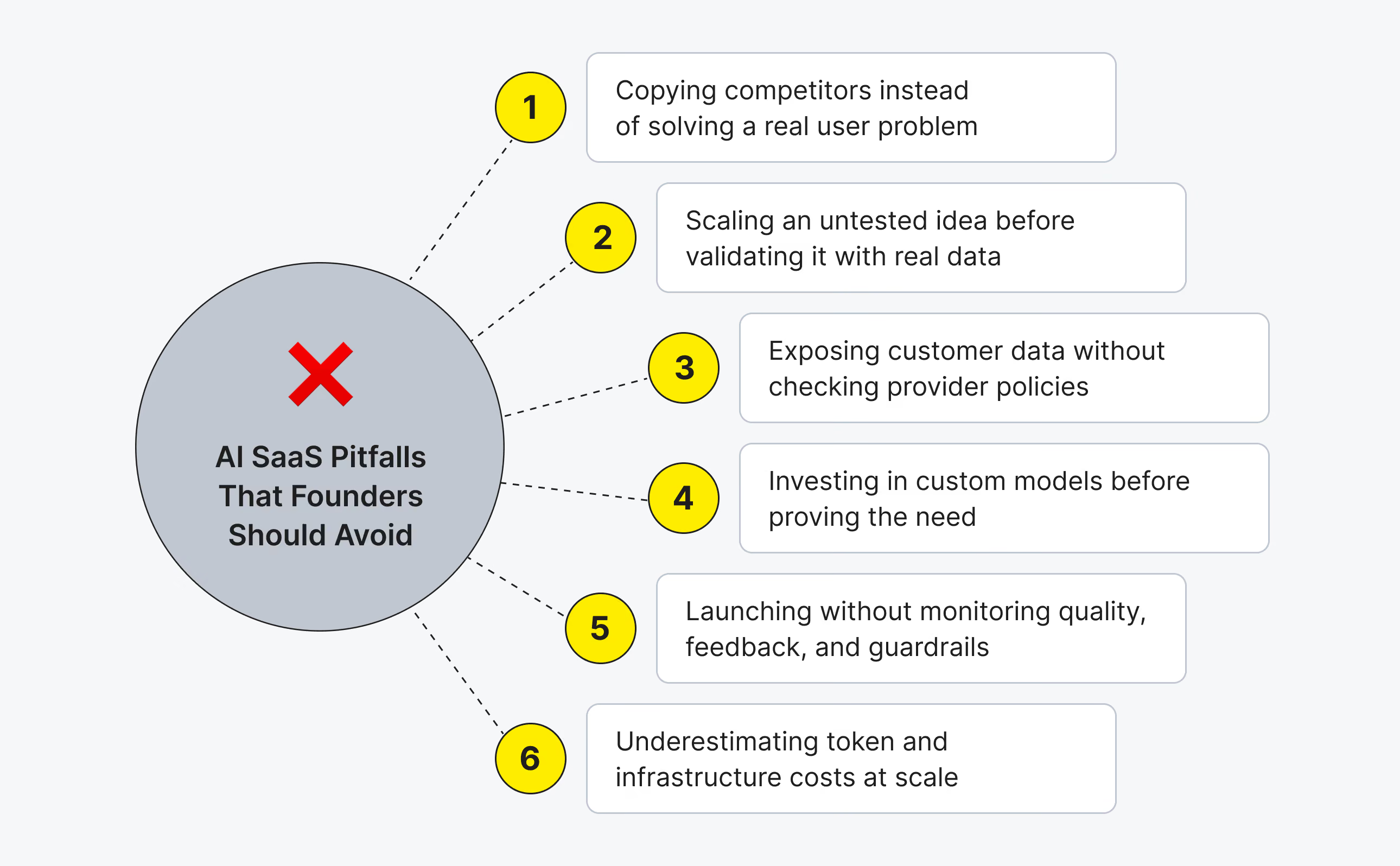
So, you have explored the key AI trends, weighed the risks, and learned how to choose a practical first use case. Still, even a promising AI idea can create unnecessary cost, security issues, or frustrated users if the team makes the wrong decisions early on. Here are the most common mistakes SaaS founders should avoid when turning an AI concept into a real product feature.
Building the Feature because a Competitor Has One
A competitor having an AI feature is not a good enough reason to copy it. If it doesn’t solve a specific problem for your users, customers may try it once and never return to it while you still pay for development, maintenance, and AI usage.
Skipping a Proof of Concept before Committing the Roadmap
Adding an AI feature to the full product roadmap before testing it is a bad idea. A small proof of concept helps you check whether the model works well enough with your real data and use case. It is much better to discover limitations in a week than after months of engineering work.
Sending Customer Data to a Third-Party Model without Reviewing the Terms
Before sending customer data to a third-party AI provider, review its security, privacy, and data-processing terms. You need to know what data leaves your product, where it is stored, and whether it may be used for model training. Skipping this step can create serious compliance and trust issues.
Reaching for Custom Model Training First
Training a custom model from scratch is expensive, slow, and unnecessary for most SaaS products. It’s better to start with an existing AI service or a model connected to your product data. Consider custom training only if off-the-shelf models can’t meet a proven need for accuracy, control, or compliance.
Treating the AI Feature as Done at Launch
An AI feature needs ongoing attention after release. User behavior, product data, and business rules change over time, which can affect the quality of model responses. Monitor output quality, collect user feedback, and update prompts, data sources, and guardrails when needed.
Estimating Cost from a Demo instead of Real Usage
Testing an AI feature with a few users doesn’t show what it will cost at scale. Most AI services use usage-based pricing, so expenses grow as more users send requests and generate longer responses. We recommend to estimate costs using realistic customer volumes and then add spending limits and monitoring before the feature goes live.
Seeking help with building your product?
Upsilon has an extensive talent pool made up of experts who can help bring your AI ideas to life!
How to Use AI in SaaS: Where to Start
AI is the new standard for smarter, faster, and more efficient SaaS. Whether you're looking to enhance automation, boost security, or personalize user experiences, now's the time to integrate AI into your product.
The most promising starting point is usually the workflow that causes the most friction for users: repetitive support requests, manual reporting, document-heavy processes, or information that is difficult to find. A focused proof of concept makes it possible to see whether an AI feature actually saves time, improves an outcome, and fits the product’s data, cost, and quality requirements.
There is rarely a need to train a custom model or redesign an entire platform at the beginning. When an initial feature proves its value, it can gradually become more useful through better data, clearer prompts, guardrails, and feedback from real users. The point is not to add AI everywhere, but to apply it where it helps customers get meaningful work done with less effort and gives the product a clear advantage.
By the way, you don't have to do it alone. If you need a hand, you can count on our generative AI development services. Upsilon's AI-savvy team is here to help you build, optimize, and scale with the latest solutions. So, if you want to turn your SaaS artificial intelligence idea into the next big thing, feel free to reach out to us to chat.
FAQ
1. What is AI in SaaS?

AI in SaaS refers to the integration of artificial intelligence into software as a service platforms to enhance their functionality and automate processes. A SaaS AI platform uses machine learning, natural language processing, and other technologies to provide smarter solutions, improve decision-making, and personalize user experience.
2. How can AI be used in SaaS?
AI can be used in SaaS to drive innovation and streamline operations by automating repetitive tasks, analyzing large datasets, and improving customer experiences. Applications of AI in SaaS include customer support automation, personalization based on user behavior, translation for global products, data analytics that surface insights instead of raw charts, and backend tasks like fraud detection or cloud cost optimization. Each one replaces a task a person used to handle by hand with a system that runs it on every case.
3. How much does it cost to add AI to a SaaS product?
Third-party AI services run $500-$1,500 a month and take the least engineering time. Letting AI access your own SaaS data for reporting or support runs $1,600 or more a month once configuration is included. Training a custom model costs the most and the range varies a lot, and it's the wrong starting point for a first AI feature in almost every case.
4. Is it safe to add AI to a SaaS product that handles customer data?
It can be, if the integration is scoped with care. Sending customer data to a third-party AI API without reviewing that vendor's data handling terms is the most common mistake. Compliance requirements like GDPR and CCPA apply to AI features the same way they apply to the rest of the product. The AI layer doesn't make an exception.
5. What AI feature should I build first in my SaaS product?
The one that answers a specific, already-documented user problem, not the newest capability on the market. A support tool where users already complain about slow response time should test AI-assisted replies before it touches analytics or design. Starting with a proof of concept on that one feature costs a fraction of building it into the roadmap outright.



to top